Note
Access to this page requires authorization. You can try signing in or changing directories.
Access to this page requires authorization. You can try changing directories.
Question
Wednesday, August 16, 2017 6:22 PM
Need you help. We use Office 365, 2016 version. I have a shared calendar for each of our vehicles and have created a Master category list with various colors assigned. We use these calendars to reflect deliveries/pickups assigned at given vehicles and the master categories/color indicated the type (e.g. equipment, supplies, pickup, deliveries, ...). These all work fine except for our newest employee.
I have shared the calendars with him and according to other post have "Upgraded to Color Categories...". However, he does not see the master category list. In the calendar he only see the default six color categories and can not edit these. However, for his inbox he can edit the categories and has all 25 colors available. What he changes in his inbox is not reflected in his calendar. The image below is from a calendar item from his Outlook that someone else updated. (This is the second and third categories, it does not effect his color, as color is null, but he can see our category names. I have scoured pages of post and can not find how to fix this, can anyone help?
Thanks in advance for any assistance. Is there any good links that shows a good way to code these in VBA?
BrianS
All replies (1)
Thursday, August 17, 2017 7:39 AM
Hi BrianS,
>> These all work fine except for our newest employee.
Have you checked if there is any difference in the permissions given to the users?
As far as I know, since Outlook 2007, the list of Color Categories (Master Category List) is stored within the main Calendar folder of the mailbox. So in order for others to see the Color Categories and not just the Category name, we need to share the main Calendar folder as well and grant the user at least "Reviewer" permission:
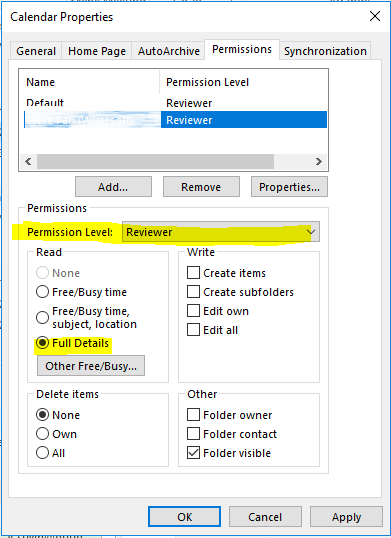
Hope this can be helpful. If you need further assistance on this, please post back at ease. You may share the relevant image mentioned in the post via OneDrive and paste a link here in case you cannot directly insert a picture right now.
Besides, since here we mainly focus on general issues about Outlook client, as per your concern about VBA code, it is encouraged to post to the MSDN forum for Outlook:
https://social.msdn.microsoft.com/Forums/en-US/home?forum=outlookdev
The reason why we recommend posting appropriately is you will get the most qualified pool of respondents, and other partners who read the forums regularly can either share their knowledge or learn from your interaction with us.
Best regards,
Yuki Sun
Please remember to mark the replies as answers if they helped.
If you have feedback for TechNet Subscriber Support, contact [email protected].