Note
Access to this page requires authorization. You can try signing in or changing directories.
Access to this page requires authorization. You can try changing directories.
Question
Thursday, December 28, 2017 3:48 PM
I am seeing the following error messages under \Monitoring\Overview\System Status\Component Status for the SMS_WSUS_CONTROL_MANAGER component:
Error 7000
WSUS Control Manager failed to configure proxy settings on WSUS Server "SCCM-SITE-SRV".
Possible cause: WSUS Server version 3.0 SP2 or above is not installed or cannot be contacted.
Solution: Verify that the WSUS Server version 3.0 SP2 or greater is installed. Verify that the IIS ports configured in the site are same as those configured on the WSUS IIS website.You can receive failure because proxy is set but proxy name is not specified or proxy server port is invalid.
Error 7003
WSUS Control Manager failed to monitor WSUS Server "SCCM-SITE-SRV".
Possible cause: WSUS Server version 3.0 SP2 or above is not installed or cannot be contacted.
Solution: Verify that the WSUS Server version 3.0 SP2 or greater is installed. Verify that the IIS ports configured in the site are same as those configured on the WSUS IIS website.
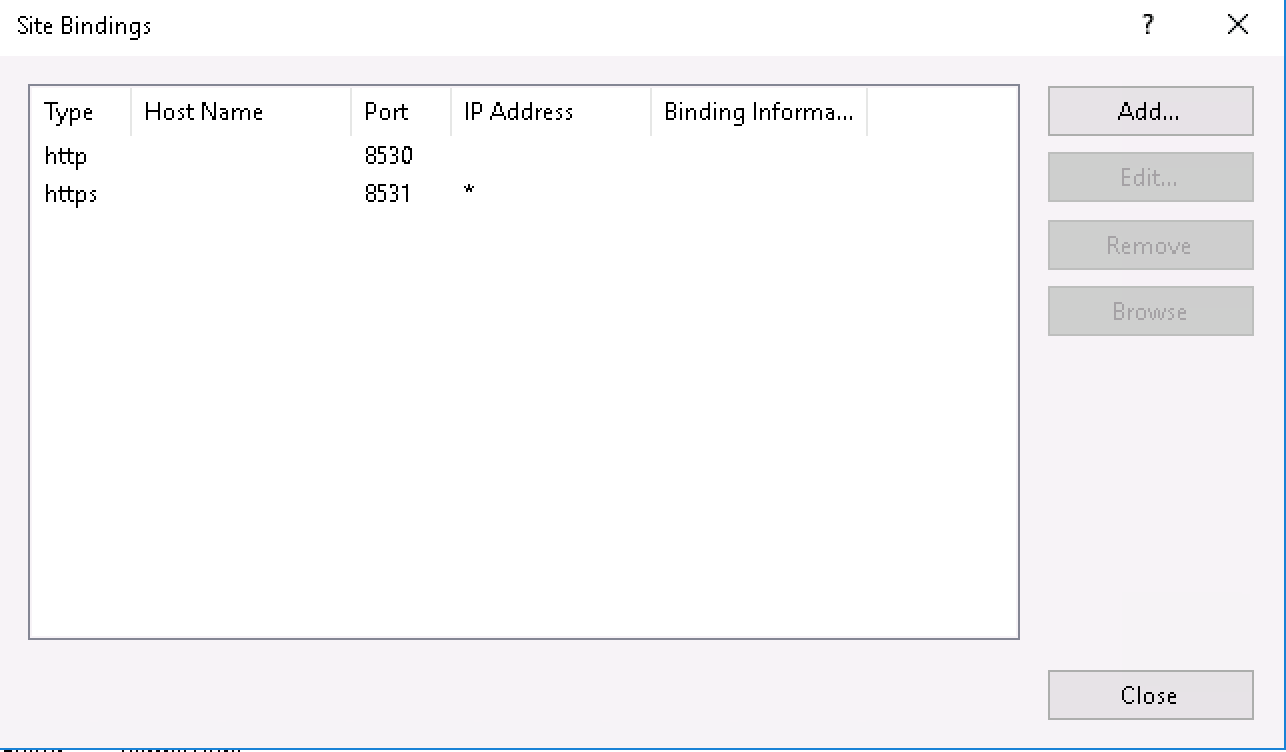
Here are the bindings for the WSUS website in IIS:
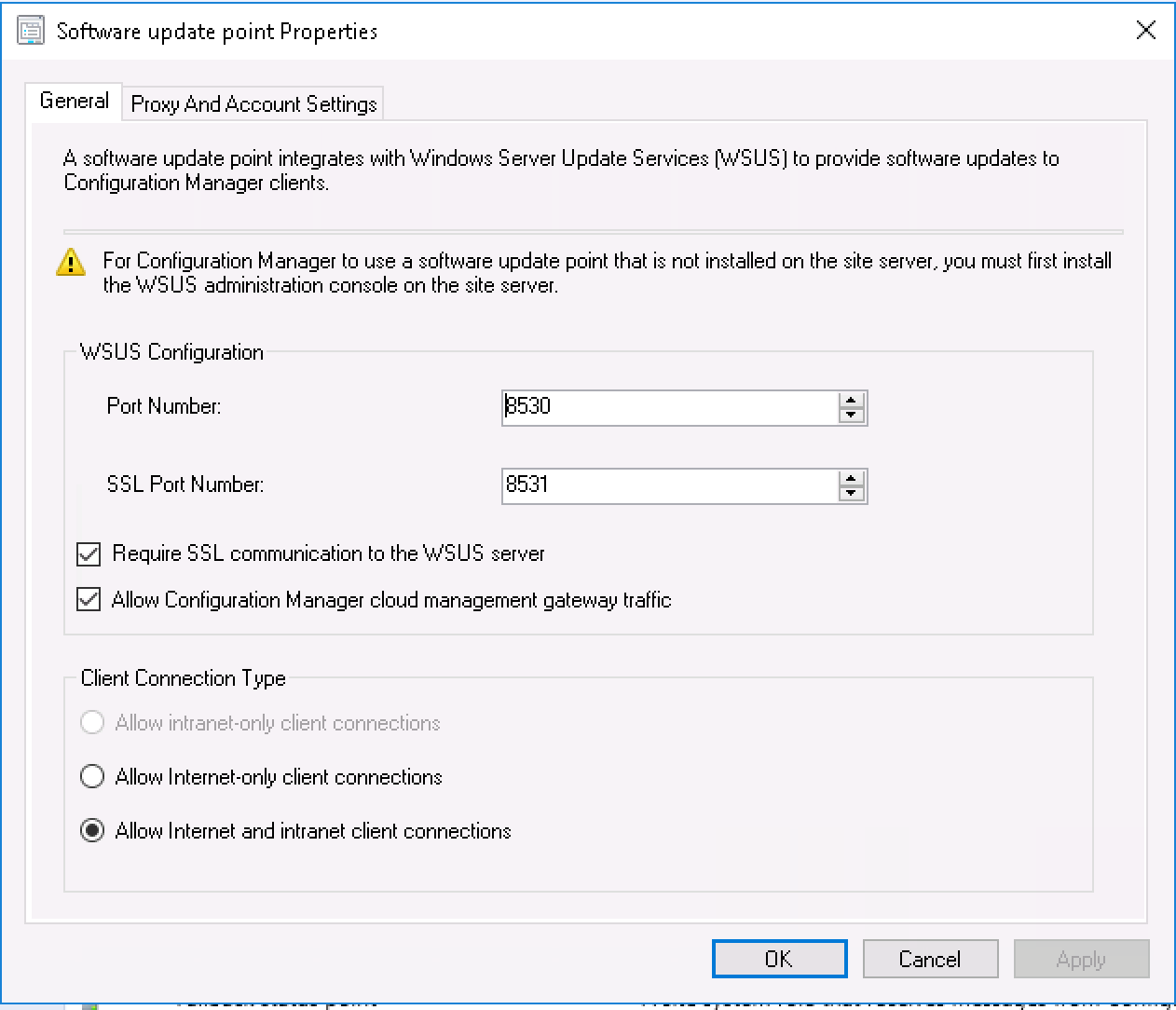
Here are my SUP properties:
WSUSCtrl.log
Checking for supported version of WSUS (min WSUS 3.0 SP2 + KB2720211 + KB2734608) SMS_WSUS_CONTROL_MANAGER 12/28/2017 7:50:23 AM 3396 (0x0D44)
Checking runtime v4.0.30319... SMS_WSUS_CONTROL_MANAGER 12/28/2017 7:50:23 AM 3396 (0x0D44)
Found supported assembly Microsoft.UpdateServices.Administration version 4.0.0.0, file version 6.3.14393.0 SMS_WSUS_CONTROL_MANAGER 12/28/2017 7:50:23 AM 3396 (0x0D44)
Found supported assembly Microsoft.UpdateServices.BaseApi version 4.0.0.0, file version 6.3.14393.1914 SMS_WSUS_CONTROL_MANAGER 12/28/2017 7:50:23 AM 3396 (0x0D44)
Supported WSUS version found SMS_WSUS_CONTROL_MANAGER 12/28/2017 7:50:23 AM 3396 (0x0D44)
Attempting connection to local WSUS server SMS_WSUS_CONTROL_MANAGER 12/28/2017 7:50:23 AM 3396 (0x0D44)
System.Net.WebException: The underlying connection was closed: Could not establish trust relationship for the SSL/TLS secure channel. > System.Security.Authentication.AuthenticationException: The remote certificate is invalid according to the validation procedure.~~ at System.Net.Security.SslState.StartSendAuthResetSignal(ProtocolToken message, AsyncProtocolRequest asyncRequest, Exception exception)~~ at System.Net.Security.SslState.CheckCompletionBeforeNextReceive(ProtocolToken message, AsyncProtocolRequest asyncRequest)~~ at System.Net.Security.SslState.ProcessReceivedBlob(Byte[] buffer, Int32 count, AsyncProtocolRequest asyncRequest)~~ at System.Net.Security.SslState.StartReceiveBlob(Byte[] buffer, AsyncProtocolRequest asyncRequest)~~ at System.Net.Security.SslState.CheckCompletionBeforeNextReceive(ProtocolToken message, AsyncProtocolRequest asyncRequest)~~ at System.Net.Security.SslState.ProcessReceivedBlob(Byte[] buffer, Int32 count, AsyncProtocolRequest asyncRequest)~~ at System.Net.Security.SslState.StartReceiveBlob(Byte[] buffer, AsyncProtocolRequest asyncRequest)~~ at System.Net.Security.SslState.CheckCompletionBeforeNextReceive(ProtocolToken message, AsyncProtocolRequest asyncRequest)~~ at System.Net.Security.SslState.ProcessReceivedBlob(Byte[] buffer, Int32 count, AsyncProtocolRequest asyncRequest)~~ at System.Net.Security.SslState.StartReceiveBlob(Byte[] buffer, AsyncProtocolRequest asyncRequest)~~ at System.Net.Security.SslState.CheckCompletionBeforeNextReceive(ProtocolToken message, AsyncProtocolRequest asyncRequest)~~ at System.Net.Security.SslState.ForceAuthentication(Boolean receiveFirst, Byte[] buffer, AsyncProtocolRequest asyncRequest)~~ at System.Net.Security.SslState.ProcessAuthentication(LazyAsyncResult lazyResult)~~ at System.Threading.ExecutionContext.RunInternal(ExecutionContext executionContext, ContextCallback callback, Object state, Boolean preserveSyncCtx)~~ at System.Threading.ExecutionContext.Run(ExecutionContext executionContext, ContextCallback callback, Object state, Boolean preserveSyncCtx)~~ at System.Threading.ExecutionContext.Run(ExecutionContext executionContext, ContextCallback callback, Object state)~~ at System.Net.TlsStream.ProcessAuthentication(LazyAsyncResult result)~~ at System.Net.TlsStream.Write(Byte[] buffer, Int32 offset, Int32 size)~~ at System.Net.ConnectStream.WriteHeaders(Boolean async)~~ End of inner exception stack trace ~~ at Microsoft.UpdateServices.Administration.AdminProxy.CreateUpdateServer(Object[] args)~~ at Microsoft.SystemsManagementServer.WSUS.WSUSServer.ConnectToWSUSServer(String ServerName, Boolean UseSSL, Int32 PortNumber) SMS_WSUS_CONTROL_MANAGER 12/28/2017 7:50:23 AM 3396 (0x0D44)
Failed to set WSUS Local Configuration. Will retry configuration in 1 minutes SMS_WSUS_CONTROL_MANAGER 12/28/2017 7:50:23 AM 3396 (0x0D44)
Attempting connection to local WSUS server SMS_WSUS_CONTROL_MANAGER 12/28/2017 7:50:23 AM 3396 (0x0D44)
System.Net.WebException: The underlying connection was closed: Could not establish trust relationship for the SSL/TLS secure channel. > System.Security.Authentication.AuthenticationException: The remote certificate is invalid according to the validation procedure.~~ at System.Net.Security.SslState.StartSendAuthResetSignal(ProtocolToken message, AsyncProtocolRequest asyncRequest, Exception exception)~~ at System.Net.Security.SslState.CheckCompletionBeforeNextReceive(ProtocolToken message, AsyncProtocolRequest asyncRequest)~~ at System.Net.Security.SslState.ProcessReceivedBlob(Byte[] buffer, Int32 count, AsyncProtocolRequest asyncRequest)~~ at System.Net.Security.SslState.StartReceiveBlob(Byte[] buffer, AsyncProtocolRequest asyncRequest)~~ at System.Net.Security.SslState.CheckCompletionBeforeNextReceive(ProtocolToken message, AsyncProtocolRequest asyncRequest)~~ at System.Net.Security.SslState.ProcessReceivedBlob(Byte[] buffer, Int32 count, AsyncProtocolRequest asyncRequest)~~ at System.Net.Security.SslState.StartReceiveBlob(Byte[] buffer, AsyncProtocolRequest asyncRequest)~~ at System.Net.Security.SslState.CheckCompletionBeforeNextReceive(ProtocolToken message, AsyncProtocolRequest asyncRequest)~~ at System.Net.Security.SslState.ProcessReceivedBlob(Byte[] buffer, Int32 count, AsyncProtocolRequest asyncRequest)~~ at System.Net.Security.SslState.StartReceiveBlob(Byte[] buffer, AsyncProtocolRequest asyncRequest)~~ at System.Net.Security.SslState.CheckCompletionBeforeNextReceive(ProtocolToken message, AsyncProtocolRequest asyncRequest)~~ at System.Net.Security.SslState.ForceAuthentication(Boolean receiveFirst, Byte[] buffer, AsyncProtocolRequest asyncRequest)~~ at System.Net.Security.SslState.ProcessAuthentication(LazyAsyncResult lazyResult)~~ at System.Threading.ExecutionContext.RunInternal(ExecutionContext executionContext, ContextCallback callback, Object state, Boolean preserveSyncCtx)~~ at System.Threading.ExecutionContext.Run(ExecutionContext executionContext, ContextCallback callback, Object state, Boolean preserveSyncCtx)~~ at System.Threading.ExecutionContext.Run(ExecutionContext executionContext, ContextCallback callback, Object state)~~ at System.Net.TlsStream.ProcessAuthentication(LazyAsyncResult result)~~ at System.Net.TlsStream.Write(Byte[] buffer, Int32 offset, Int32 size)~~ at System.Net.ConnectStream.WriteHeaders(Boolean async)~~ End of inner exception stack trace ~~ at Microsoft.UpdateServices.Administration.AdminProxy.CreateUpdateServer(Object[] args)~~ at Microsoft.SystemsManagementServer.WSUS.WSUSServer.ConnectToWSUSServer(String ServerName, Boolean UseSSL, Int32 PortNumber) SMS_WSUS_CONTROL_MANAGER 12/28/2017 7:50:23 AM 3396 (0x0D44)
Failures reported during periodic health check by the WSUS Server DC-SCCM-PRI.CFPCORP.AD.CFP. Will retry check in 1 minutes SMS_WSUS_CONTROL_MANAGER 12/28/2017 7:50:23 AM 3396 (0x0D44)
All replies (4)
Thursday, December 28, 2017 11:57 PM ✅Answered
Well I dont know why all of a sudden this worked this time around, but I reran the following WSUS SSL Configuration tool using PowerShell on my SCCM Site Server and it seemed to have resolved problem:
$myFQDN=(Get-WmiObject win32_computersystem).DNSHostName+"."+(Get-WmiObject win32_computersystem).Domain

&wsusutil configuressl $myFQDN
Monday, July 2, 2018 5:20 PM
I tried this and powershell says wsusutil is not recognized as a command. Any advice?
Thomas Faherty
Friday, September 21, 2018 6:39 PM
wsusutil is located in C:\Program Files\Update Services\Tools
The script above needs to be executed from this path
Friday, September 21, 2018 6:54 PM
wsusutil is located in C:\Program Files\Update Services\Tools
The script above needs to be executed from this path
Perfect, thank you.
Thomas Faherty