Developer technologies | .NET | Other
Microsoft Technologies based on the .NET software framework. Miscellaneous topics that do not fit into specific categories.
This browser is no longer supported.
Upgrade to Microsoft Edge to take advantage of the latest features, security updates, and technical support.
' cx='32' cy='32' r='32' /%3E%3Ctext x='50%25' y='55%25' dominant-baseline='middle' text-anchor='middle' fill='%23FFF' %3EPT%3C/text%3E%3C/svg%3E)
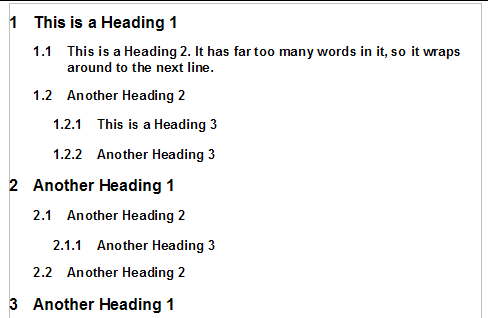
Hi, I am new to C#, I am creating a small application, and I need to generate some PDF reports from C# application programmatically. Most of the reports will be Word-like multilevel lists with hierarchical numbering (these numbers have to be calculated automatically). And I want that the levels have indent from the left. I tried several PDF libraries, but none of them can calculate hierarchical numbering. Maybe someone could tell me some library, or how to do it without a library?
I mean something like this:
Microsoft Technologies based on the .NET software framework. Miscellaneous topics that do not fit into specific categories.
A set of technologies in .NET for building web applications and web services. Miscellaneous topics that do not fit into specific categories.
An object-oriented and type-safe programming language that has its roots in the C family of languages and includes support for component-oriented programming.
Locked Question. You can vote on whether it's helpful, but you can't add comments or replies or follow the question.
This answer has been deleted due to a violation of our Code of Conduct. The answer was manually reported or identified through automated detection before action was taken. Please refer to our Code of Conduct for more information.
Comments have been turned off. Learn more

or how to do it without a library?
Just use :
PrintDocument.PrinterSettings.PrinterName = "Microsoft Print to PDF";
PrintDocument.PrinterSettings.PrintToFile = true;
PrintDocument.PrinterSettings.PrintFileName = "your_pdf_filename"";
and you can draw/write anything in PrintPageEventHandler which will be saved into the .pdf file
' cx='32' cy='32' r='32' /%3E%3Ctext x='50%25' y='55%25' dominant-baseline='middle' text-anchor='middle' fill='%23FFF' %3EBS%3C/text%3E%3C/svg%3E)
PDF is graphics language, not reporting language. maybe you want a reports toolkit that supports pdf output.
to your question. you would write code to handle the indenting and numbering, similar to the logic you would use with Console.Write()