Microsoft Security | Windows Autopilot
A service that simplifies device provisioning and setup for end users, enabling zero-touch deployment

This browser is no longer supported.
Upgrade to Microsoft Edge to take advantage of the latest features, security updates, and technical support.

Hello,
We got this issue at Windows 11 - when leaving ESP from Autopilot Deployment and Im about to setup WHfB - facial recognition goes ok, but PIN fails.
Stating "This sign in option is only available when connected to your organization's network".
When I go to Sign-In Options afterwards - I get this message.
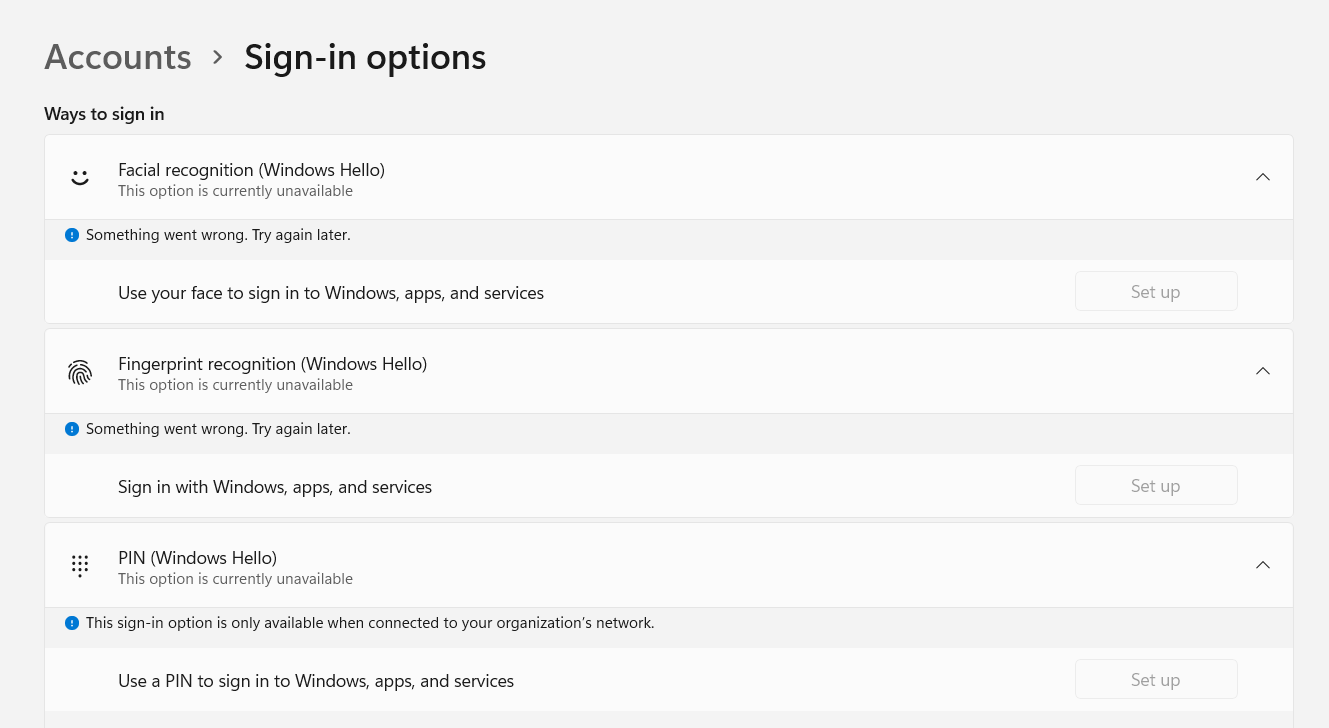
Anyone else is having this issue?
Could this issue be related to TPM issues?
A service that simplifies device provisioning and setup for end users, enabling zero-touch deployment
Locked Question. You can vote on whether it's helpful, but you can't add comments or replies or follow the question.

Hello,
Try to enable PIN using registry, see if it helps:
-Open Registry Editor.
-Go to HKEY_LOCAL_MACHINE\SOFTWARE\Policies\Microsoft\Windows\System.
-Set AllowDomainPINLogon to 1.
-Close Registry Editor and reboot your system.
Hope this helps!
Had to reset my TEST pc at work - in order to test other things, but I will try this out next time I am able to reproduce the issue.
Have you had the same experience as me with PIN setup fails?
' cx='32' cy='32' r='32' /%3E%3Ctext x='50%25' y='55%25' dominant-baseline='middle' text-anchor='middle' fill='%23FFF' %3EJP%3C/text%3E%3C/svg%3E)
Run dsregcmd /status and look for something like this:
AzureAdPrt : NO AADSTS500191: The certificate authority that issued your certificate has not been set up in the tenant. Please contact your administrator.
If you see that, you may need to configure your on-prem CA in Entra, then enable it as an Authentication Method.

' cx='32' cy='32' r='32' /%3E%3Ctext x='50%25' y='55%25' dominant-baseline='middle' text-anchor='middle' fill='%23FFF' %3EHP%3C/text%3E%3C/svg%3E)