Developer technologies | C#
An object-oriented and type-safe programming language that has its roots in the C family of languages and includes support for component-oriented programming.
This browser is no longer supported.
Upgrade to Microsoft Edge to take advantage of the latest features, security updates, and technical support.
' cx='32' cy='32' r='32' /%3E%3Ctext x='50%25' y='55%25' dominant-baseline='middle' text-anchor='middle' fill='%23FFF' %3EOV%3C/text%3E%3C/svg%3E)
How about guys I need your help to program an application in c #. I have a folder that is constantly fed with documents and we must always add them manually, something that is complicated by the large number of files so I wanted to program something that allows me to join a pdf document to other files and I would like to know if there is a library for c#, c++ or .NET to allow me to do this. I attach a screenshot of the idea.
I was looking on the internet but I only find guides to join two documents and it is not what I am looking for
I hope you can help me
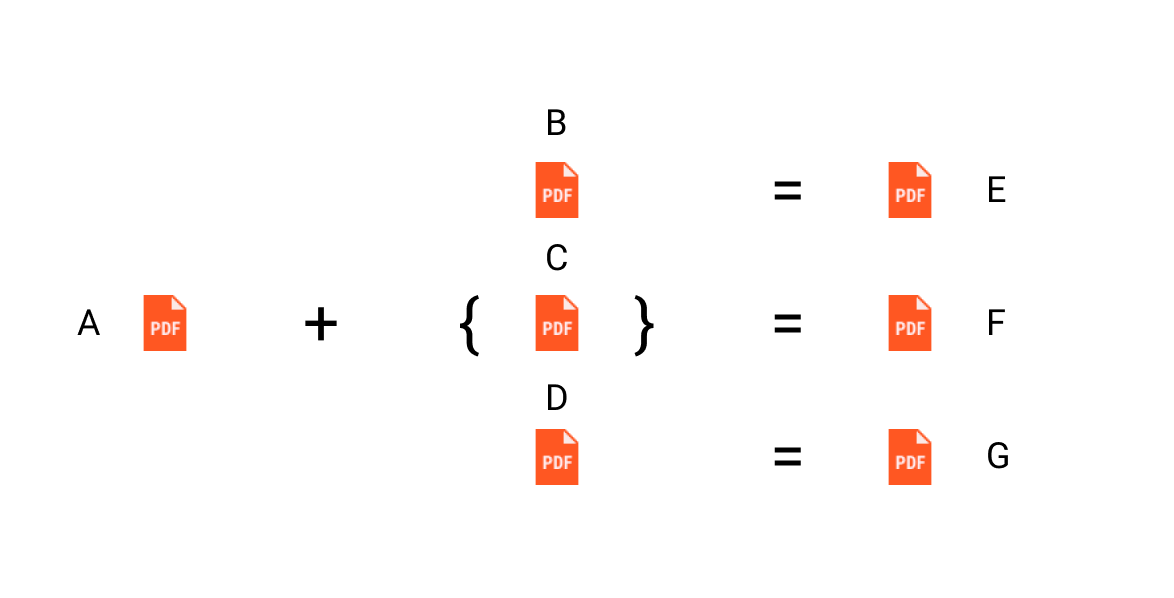
Locked Question. You can vote on whether it's helpful, but you can't add comments or replies or follow the question.

@Anonymous , is any update? Please check if my answer works for you.
Thanks!
' cx='32' cy='32' r='32' /%3E%3Ctext x='50%25' y='55%25' dominant-baseline='middle' text-anchor='middle' fill='%23FFF' %3ED%3C/text%3E%3C/svg%3E)
Hi there, I suggest that you can use Spire.PDF for .NET (available on NuGet) to do this job. Spire.PDF is a C# class library for creating and manipulating PDF documents on .NET platform.
Below is the code example for your referenece.
using System.IO;
using Spire.Pdf;

namespace MergeFiles
{
    class Program
    {
        static void Main(string[] args)
        {
            //Specify source file
            string sourceFile = @"C:\Users\Administrator\Desktop\source.pdf";
            //Get files to merge in the "ToMerge" folder
            string[] filesToMerge = Directory.GetFiles(@"C:\Users\Administrator\Desktop\ToMerge");
            //Specify the output folder
            string outputFolder = @"C:\Users\Administrator\Desktop\Merged\";
            //Create a new document
            PdfDocumentBase newPdf;
            //Traverse all files in the "ToMerge" folder
            for (int i = 0; i < filesToMerge.Length; i++)
            {
                //Merge the source file "A" and another file in the "ToMerge" folder
                newPdf = PdfDocument.MergeFiles(sourceFile, filesToMerge[i]);
                //Save the document to a different PDF file
                string fileName = string.Format("Output-{0}.pdf", i + 1);
                newPdf.Save(outputFolder + fileName, FileFormat.PDF);
            }
        }
    }
}
This answer has been deleted due to a violation of our Code of Conduct. The answer was manually reported or identified through automated detection before action was taken. Please refer to our Code of Conduct for more information.
Comments have been turned off. Learn more
@Anonymous , as others said, you could use iTextSharp to join a pdf to multiple PDFs in c#.
Based on the code I have written from the link 4 PDF file marge to 1 PDF , I made some changes and the following code can get what you want.
static void Main(string[] args)
        {
            string sourcefile = "D:\\PDF\\A.pdf";
            string[] file = { "D:\\PDF\\B.pdf", "D:\\PDF\\C.pdf", "D:\\PDF\\D.pdf" };
            MergePDFs(file,sourcefile);

        }

        public static void MergePDFs(string []addedfilename,string sourcefilename)
        {
            foreach (var item in addedfilename)
            {
                string targetfilename = "";
                if(item.Contains("B.pdf"))
                {
                    targetfilename ="D:\\PDF\\E.pdf";
                }
                if (item.Contains("C.pdf"))
                {
                    targetfilename ="D:\\PDF\\F.pdf";
                }
                if (item.Contains("D.pdf"))
                {
                    targetfilename ="D:\\PDF\\G.pdf";
                }
                using (FileStream stream = new FileStream(targetfilename, FileMode.Create))
                {
                    Document document = new Document();
                    PdfCopy pdf = new PdfCopy(document, stream);
                    PdfReader reader = null;
                    try
                    {
                        document.Open();
                        reader = new PdfReader(sourcefilename);
                        pdf.AddDocument(reader);
                        reader = new PdfReader(item);
                        pdf.AddDocument(reader);
                        reader.Close();

                    }
                    catch (Exception)
                    {
                        if (reader != null)
                        {
                            reader.Close();
                        }
                    }
                    finally
                    {
                        if (document != null)
                        {
                            document.Close();
                        }
                    }
                }
            }
        }
Note: Please don't forget to install nuget-package iTextSharp.
If the answer is the right solution, please click "Accept Answer" and kindly upvote it. If you have extra questions about this answer, please click "Comment".
Note: Please follow the steps in our documentation to enable e-mail notifications if you want to receive the related email notification for this thread.
This answer has been deleted due to a violation of our Code of Conduct. The answer was manually reported or identified through automated detection before action was taken. Please refer to our Code of Conduct for more information.
Comments have been turned off. Learn more
' cx='32' cy='32' r='32' /%3E%3Ctext x='50%25' y='55%25' dominant-baseline='middle' text-anchor='middle' fill='%23FFF' %3EJZ%3C/text%3E%3C/svg%3E)