For years, I have been copying important files from Win10 off to a USB drive formatted in exFAT. Once in a while, I checked that I could open some of the copied files and it all seemed to work fine.
The computer I used perished. I bought a new one and initialized the Windows 11 Home environment.
When I try to access the "backup" files on the USB drive, I cannot open any of them! They are all set to be accessible only by my account on my now-dead computer!!
Apparently, the files were encrypted using "Microsoft Enhanced Cryptographic Provider v1.0". I recovered the certificates for the user-account from my old hard drive and imported them into the new computer using certmgr.msc. But I continue to be unable to open (or even to copy/paste!) the files.
The error reported by Edge when I try to open a PDF file is:
The file at **file:///D:/UserFiles/Taxes/TurboTax/DL/TDAmeritrade.pdf** is not readable. It may have been moved or removed, or file permissions may be blocking access.
ERR_ACCESS_DENIED
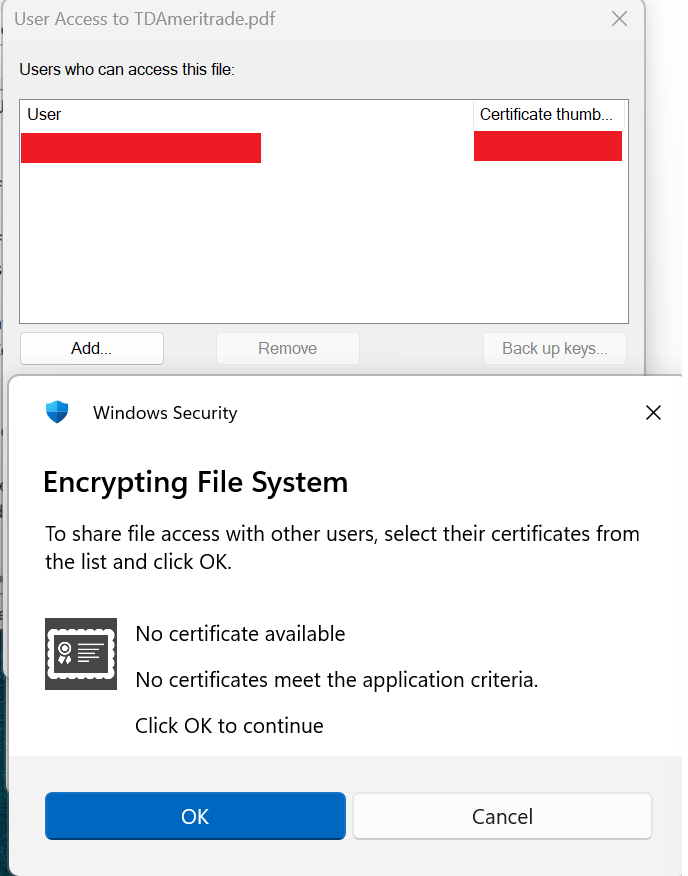
When I right-click that file and select Properties, there is no Security Tab. From Properties, I can click Advanced->Details to see a list of "Users who can access this file". The only User in the list is my account from the old computer. This is the dialog that appears when I click "Add...":
' cx='32' cy='32' r='32' /%3E%3Ctext x='50%25' y='55%25' dominant-baseline='middle' text-anchor='middle' fill='%23FFF' %3EJM%3C/text%3E%3C/svg%3E)

' cx='32' cy='32' r='32' /%3E%3Ctext x='50%25' y='55%25' dominant-baseline='middle' text-anchor='middle' fill='%23FFF' %3ECL%3C/text%3E%3C/svg%3E)