Azure API Management
An Azure service that provides a hybrid, multi-cloud management platform for APIs.
This browser is no longer supported.
Upgrade to Microsoft Edge to take advantage of the latest features, security updates, and technical support.
' cx='32' cy='32' r='32' /%3E%3Ctext x='50%25' y='55%25' dominant-baseline='middle' text-anchor='middle' fill='%23FFF' %3EAA%3C/text%3E%3C/svg%3E)
We are deploying a new Azure API Management (APIM) instance using EV2 + ARM templates. The deployment successfully progresses through EV2 and ARM, and the APIM resource is created, but activation consistently fails before reaching a successful provisioning state. Configuration
- APIM SKU: Premium
- Primary Region: Central US
- Additional Region: East US 2
- Public Network Access: Enabled
- VNET: Disabled (
virtualNetworkType=None)- System Assigned Managed Identity enabled Issue After ~1 hour 22 minutes, the rollout fails with:
{ "code": "ActivationFailed", "message": "Unable to activate API service at this time. This could be temporary issue in the region..." } Correlation ID: faf69575-7f3f-4501-998e-aef8ed2c8851 Timestamp: 7/30/2026 7:03:44 AM I deleted the failed APIM resource and retried the deployment, but the same failure occurred. Additionally, Azure Activity Logs show: Deployment failure - Region not supported The region is not supported for v2 tiers.
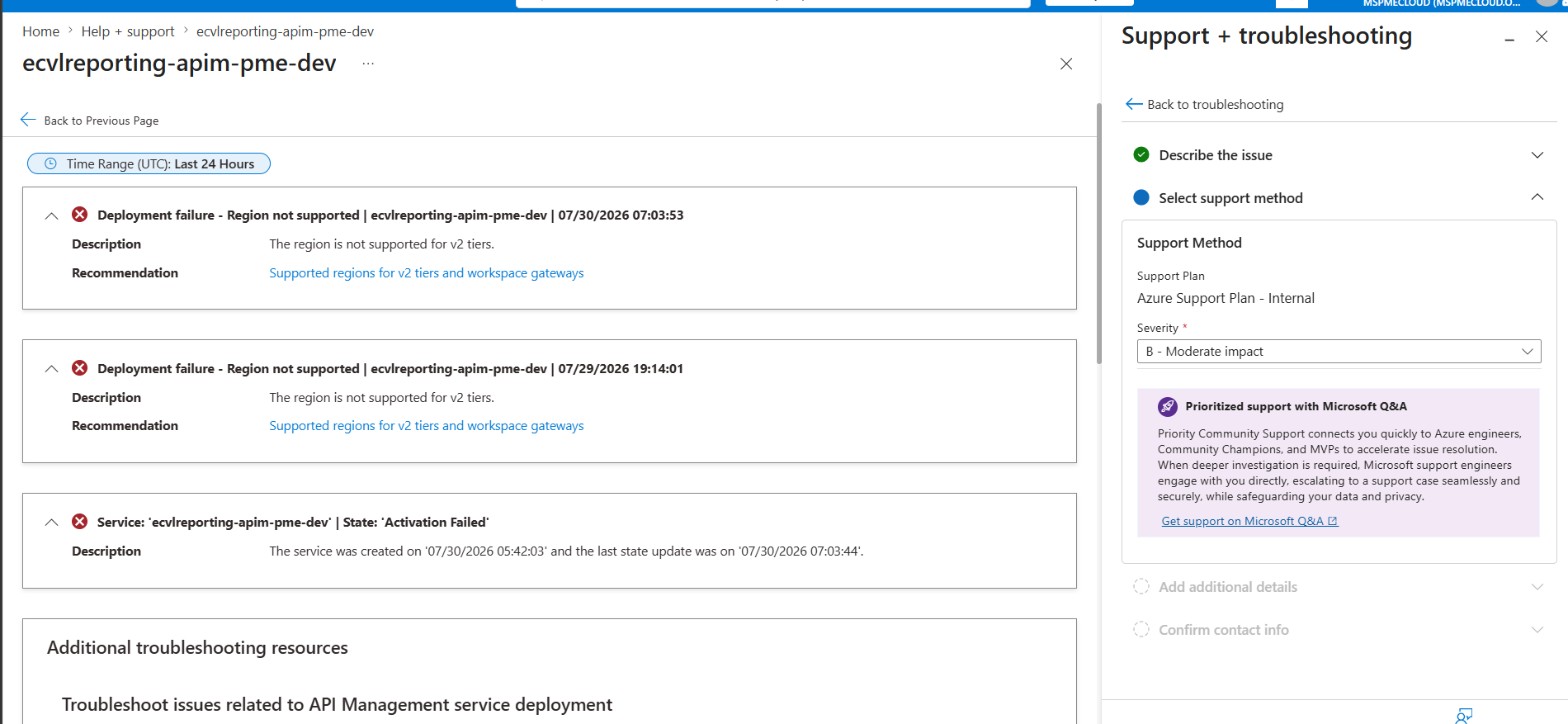
Could you please help determine the root cause of the activation failure and whether this is related to regional capacity/tier availability, or another APIM platform-side issue? Attached are the EV2 rollout logs, deployment operation details, Activity Log entries, correlation ID, and timestamps.
An Azure service that provides a hybrid, multi-cloud management platform for APIs.
' cx='32' cy='32' r='32' /%3E%3Ctext x='50%25' y='55%25' dominant-baseline='middle' text-anchor='middle' fill='%23FFF' %3ELS%3C/text%3E%3C/svg%3E)
Hi @Ali Ashraf Mohammad ,
Welcome to Microsoft Q&A, and thank you for posting your question.
Since you mentioned that you're deploying a Premium API Management instance, these two observations don't appear to align. The first step is to verify which SKU Azure is actually attempting to deploy, because the portal is specifically reporting a v2 tier limitation.
Step 1: Verify the deployed SKU
Before deleting the failed API Management instance, please run the following Azure CLI command:
Please check the value returned for sku:
Step 2: Verify that the correct SKU is being deployed
The screenshot indicates that Azure is attempting to provision a v2 tier, and the deployment is failing because the selected region is not supported.
If your deployment includes multiple regions (for example, Central US as the primary region and East US 2 as an additional location), please verify that your ARM, Bicep, or Terraform template is deploying the Premium (classic) SKU rather than Premium v2, since Premium v2 does not currently support multi-region deployments.
Step 3: Check for a soft-deleted API Management instance
If you've deleted and recreated the API Management instance using the same name, a soft-deleted instance may still be reserving that name.
Please run:
If a deleted instance is found, purge it before attempting another deployment.
Step 4: Purge the deleted instance (if present)
After the purge completes, retry the deployment.
Step 5: Verify the provisioning state
Once the deployment completes, confirm that the provisioning state is successful:
The expected result is:
If:
please share the following:
az apim show command above.I hope this helps. Please let us know the results of the above checks, and we'll be happy to assist you further.
Hi @Ali Ashraf Mohammad ,
Following up to see if you had a chance to check my previous response and if it was helpful. Please do let me know if you're still facing the issue and need any further assistance on this.
' cx='32' cy='32' r='32' /%3E%3Ctext x='50%25' y='55%25' dominant-baseline='middle' text-anchor='middle' fill='%23FFF' %3ESS%3C/text%3E%3C/svg%3E)
Hello Ali Ashraf Mohammad,
Welcome to the Microsoft Q&A and thank you for posting your questions here.
I understand that you are having "Unable to activate API service at this time" error.
The activation failure is caused by deploying Azure API Management Consumption tier in Azure Government, which is not supported. - https://learn.microsoft.com/en-us/azure/api-management/api-management-features
What you can do is to:
After changing the SKU from Consumption to a supported APIM tier and confirming the target Azure Government region supports the selected tier, the deployment should proceed through activation. Azure Support is only required if a supported SKU still fails after validating region availability, subscription quota, provider registration, and soft-deleted name conflicts.
I hope this is helpful. Please! Do not hesitate to let me know if you have any other questions, steps or clarifications.
Please do not close the thread by upvoting and accepting the answer if any part of it is helpful.

Hi Ali,
I had a look at the issue and the multi-region deployment guidance. The multi-region feature is not something that can fix the "Unable to activate API service" error because it applies only after the APIM instance has been successfully provisioned. It is mainly used to add additional regional gateways for better availability and lower latency.
For this activation failure, I would suggest checking:
Azure Service Health for any APIM-related outage in the selected region
Whether the APIM SKU is currently available in that region
Whether there is a previous failed or soft-deleted APIM instance using the same name
The deployment error details, including correlation ID and timestamp, if available
If the issue continues after retrying the deployment, Microsoft Support may need to investigate the backend provisioning failure.
Hope this helps. If you can share the APIM region, SKU, and the full error details, we can look further.
Thanks,
Karan