Hello Sylus Applegate!
Thank you for sharing the details. From what you described, your account may still be linked as a member/child account under an old Microsoft Family group, but the organizer account is no longer known or accessible.
First, please sign in at https://account.microsoft.com/family/home and check whether you see a Leave family group option beside your account. If that option is not available, it usually means the account cannot remove itself, and an organizer must remove it.
If you think the organizer was an old account you owned, try Microsoft’s account recovery or username recovery options first. If the organizer is unknown, I’d also recommend changing your password and checking recent account activity, just in case the account was added without your knowledge.
Since this is a user-to-user forum, we can’t identify or remove the organizer account here. If recovery is not possible, the best next step is to contact Microsoft Support and explain that your account is stuck in a Family group with an unknown or inaccessible organizer.
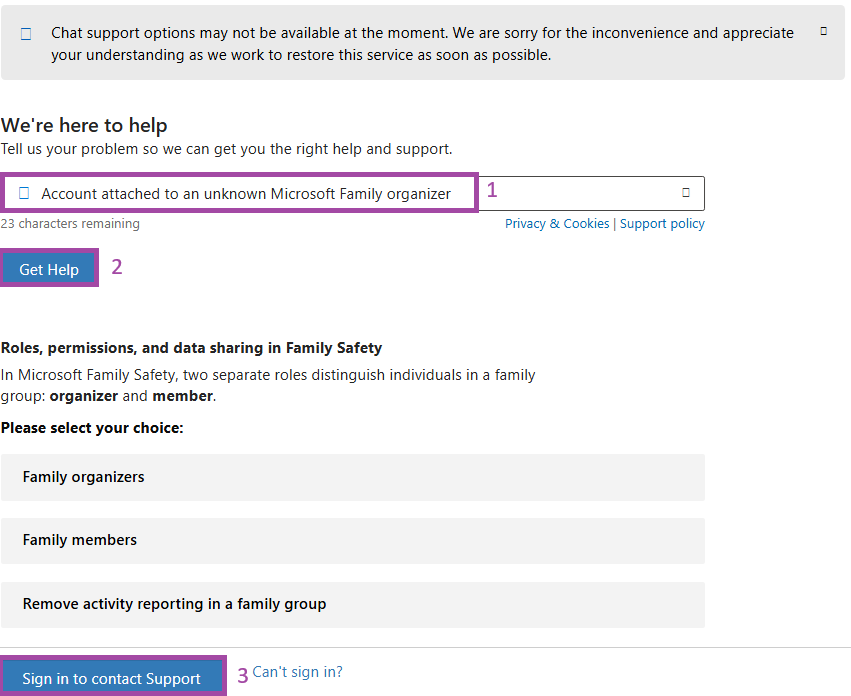
Here's how to reach out to the Support Team (live chat):
Go to: https://support.microsoft.com/home/contact
- In the search box, enter a short description of your issue, for example: Account attached to an unknown Microsoft Family organizer
- Hit "Get Help"
- Next, you can try the on-screen suggestions first, or scroll down and select Sign in to contact support (make sure you sign in with your personal Microsoft account), then follow the prompts to reach the Support team.
Tip: Chat support may not always be available at the moment due to a temporary service issue. If that happens, trying again later or at a different time may help.
Hopefully your issue will soon be sorted out. Thank you so much for your patience!
Best regard.
' cx='32' cy='32' r='32' /%3E%3Ctext x='50%25' y='55%25' dominant-baseline='middle' text-anchor='middle' fill='%23FFF' %3ESA%3C/text%3E%3C/svg%3E)

' cx='32' cy='32' r='32' /%3E%3Ctext x='50%25' y='55%25' dominant-baseline='middle' text-anchor='middle' fill='%23FFF' %3ENL%3C/text%3E%3C/svg%3E)