Hi Dung, Hoa Thi Thuy (ACC-NVLG)
The error message "550 5.7.1 Message rejected as spam by Content Filtering" indicates that the receiving mail server has flagged your email as potential spam and blocked it. This can happen for a variety of reasons, ranging from the content of the email to technical settings on your domain.
If you are sending from Microsoft 365 to an external recipient:
- Check Email Content: Sometimes, specific signatures, URLs, or attachments can trigger spam filters. Try sending a plain text test email without your signature or attachments to see if it goes through.
- Verify DNS Records (SPF, DKIM, DMARC): This is the most common cause. If your domain does not have these records set up correctly, external servers (like Gmail, Yahoo, or other businesses) will reject your mail to prevent spoofing. You can verify your configuration here: Set up SPF identify valid email sources for your Microsoft 365 domain - Microsoft Defender for Offi…
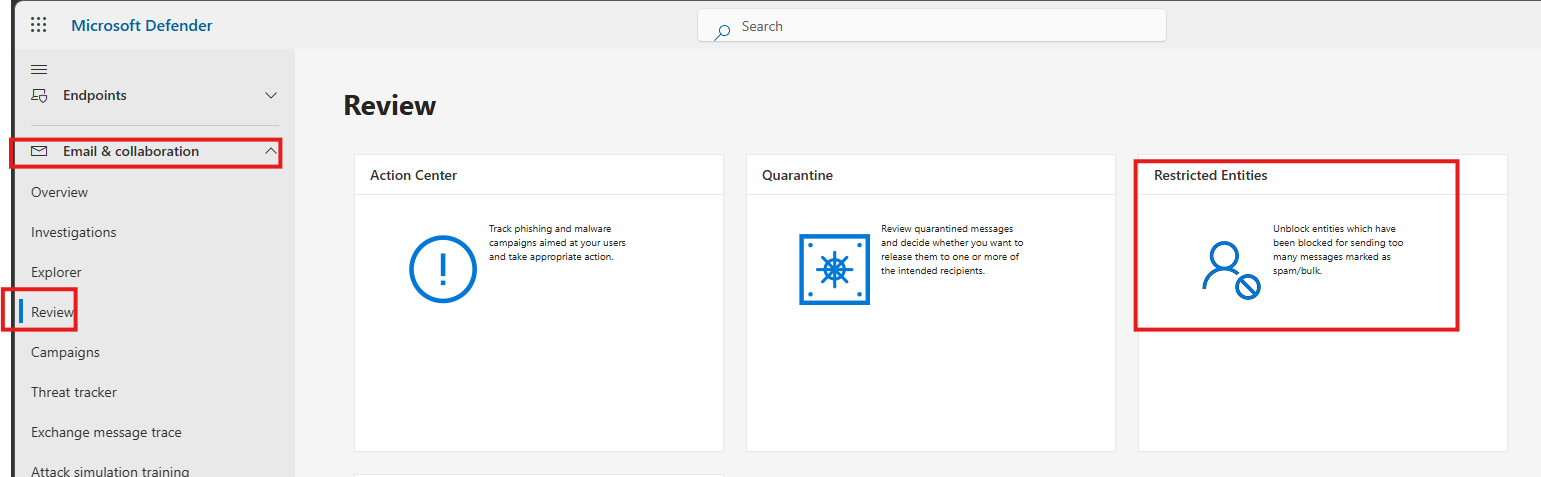
- Check if you are blocked internally: If you have sent a large volume of mail recently, Microsoft 365 may have restricted your account. For Admins, please go to the Microsoft 365 Defender Portal > Email & collaboration > Review > Restricted entities. If the user account is listed there, unblock it.
External senders are trying to email you (Into Microsoft 365)
If people trying to email you are getting this error, your Microsoft 365 security settings are too aggressive for that sender.
- Safe Senders: Ask the recipient to add the sender's domain to their Safe Senders list in Outlook.
- Admin Whitelisting: If you are an Admin, you can adjust the Anti-Spam policies in the Microsoft 365 Defender Portal to allow specific domains or IP addresses that are being falsely flagged.
You are sending to a Microsoft 365 account from outside
If you are not a Microsoft customer but are getting blocked when sending to one, your IP address may have a temporary poor reputation. You can request to have your IP delisted from the Microsoft blocklist here: Office 365 Anti-Spam IP Delist Portal
If the steps above do not work, it will be best to contact your IT administrator to create a support request: Get support - Microsoft 365 admin | Microsoft Learn. Microsoft support technical experts can check the backend logs to see exactly which filter rule is blocking your mail.
Just a quick note that this forum is a peer-to-peer community, so while members can share advice and experiences only.
I hope this information helps, and if you need any further details, please feel free to ask in the comment section.
Note: Please follow the steps in our documentation to enable e-mail notifications if you want to receive the related email notification for this thread.
' cx='32' cy='32' r='32' /%3E%3Ctext x='50%25' y='55%25' dominant-baseline='middle' text-anchor='middle' fill='%23FFF' %3EDH%3C/text%3E%3C/svg%3E)
' cx='32' cy='32' r='32' /%3E%3Ctext x='50%25' y='55%25' dominant-baseline='middle' text-anchor='middle' fill='%23FFF' %3EHN%3C/text%3E%3C/svg%3E)
