Azure Container Registry
An Azure service that provides a registry of Docker and Open Container Initiative images.
This browser is no longer supported.
Upgrade to Microsoft Edge to take advantage of the latest features, security updates, and technical support.
' cx='32' cy='32' r='32' /%3E%3Ctext x='50%25' y='55%25' dominant-baseline='middle' text-anchor='middle' fill='%23FFF' %3EA%3C/text%3E%3C/svg%3E)
When trying to create a cache rule for an ACR for dhi.io, I get the following error:
Unsupported upstream or login server 'dhi.io/*' provided. Supported upstreams or login servers are: docker.io, mcr.microsoft.com, quay.io, public.ecr.aws, ghcr.io, nvcr.io, registry.k8s.io, gcr.io, eu.gcr.io, *.pkg.dev.
dhi.io is the docker hardened images registry provided by docker, which is like docker.io
Why is this not supported?
Is there a way around this?
Thanks a lot!
An Azure service that provides a registry of Docker and Open Container Initiative images.
Hi, I have read the Azure docs that you have pasted here.
When I put dhi.io as the repository path, I get the error I mentioned.
' cx='32' cy='32' r='32' /%3E%3Ctext x='50%25' y='55%25' dominant-baseline='middle' text-anchor='middle' fill='%23FFF' %3EMD%3C/text%3E%3C/svg%3E)
Hello @Adami
Azure Container Registry Artifact Cache enforces a fixed allow‑list of supported upstream registries as documented on Microsoft Learn. Since dhi.io is not included in the supported upstream registry list, it is treated as an unsupported login server and rejected during validation. Even though Docker owns dhi.io, it is a separate registry endpoint and is not equivalent to docker.io. Direct caching from dhi.io is therefore not supported today.
“Optimize image pulls with artifact cache in Azure Container Registry”
https://learn.microsoft.com/en-us/azure/container-registry/artifact-cache-overview
Under the “Upstream support” section, Microsoft explicitly states:
Artifact cache currently supports the following upstream registries:
docker.iomcr.microsoft.comquay.iopublic.ecr.awsghcr.ionvcr.ioregistry.k8s.iogcr.ioecr.*pkg.devThis is the exact allow‑list enforced by ACR Artifact Cache validation
Currently only a limited set of upstream registries are supported… There is no option to configure arbitrary registries as upstream.
https://github.com/Azure/acr/issues/849
Thanks,
Manish Deshpande.
' cx='32' cy='32' r='32' /%3E%3Ctext x='50%25' y='55%25' dominant-baseline='middle' text-anchor='middle' fill='%23FFF' %3ETD%3C/text%3E%3C/svg%3E)
Recently Docker Hardened Images have been made free and publicly available. It would be very helpful if we could also use them via caching rules in the Azure Container Registry. Are there any plans for adding dhi.io to the list of options?
Hello @Tuanke de Beun
Thank you for your question.
For timely and effective assistance from the community, I recommend creating a new thread with your question on Microsoft Q&A.
You’re correct that Docker Hardened Images are now publicly available, and we understand the value of being able to consume them through Azure Container Registry (ACR) artifact cache rules for improved reliability, security, and performance.
Azure Container Registry artifact cache supports caching images from specific upstream registries that are explicitly listed as supported in Microsoft documentation. At this time, only those documented upstream registries are supported for cache rules, and the list does not currently include Docker Hardened Images as a distinct upstream option.
This means that Docker Hardened Images cannot yet be referenced directly as a selectable upstream source in ACR cache rules.
Hello @Adami
Configure Artifact cache
To create and configure the cache rule that pulls artifacts from the repository into your cache, follow these steps.
"Follow the steps to create Generic a cache rule"(Not the dhi,io as its not supported).
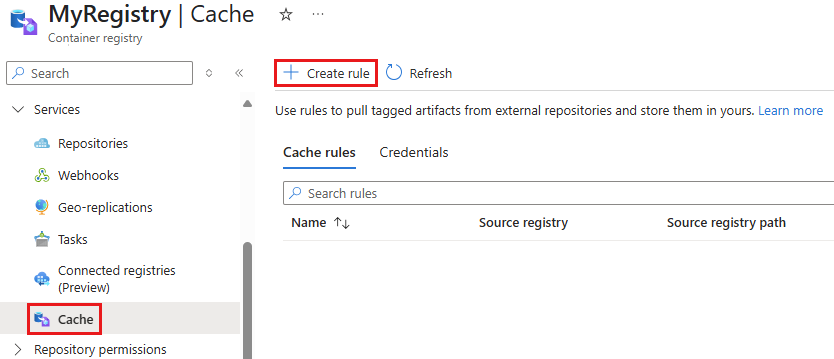
Navigate to your Azure Container Registry instance.
In the service menu, under Services, select Cache.
Select Create rule.
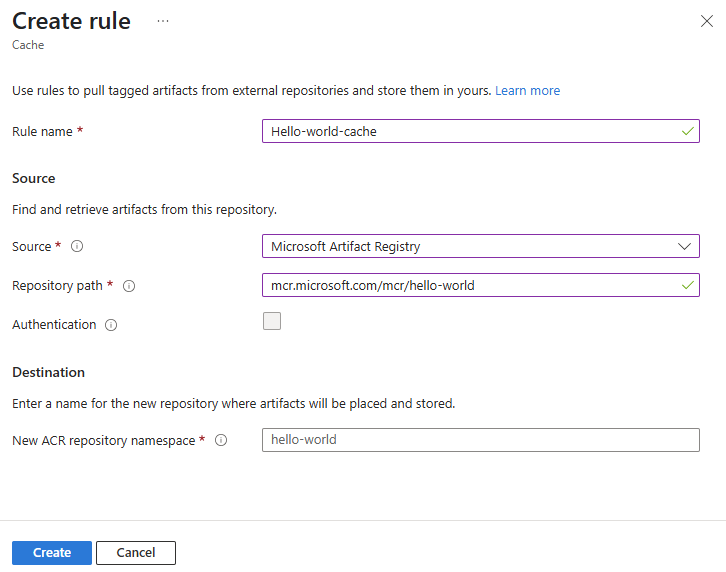
In the New cache rule pane, enter a Rule name.
For Source, select a login server.
For Repository Path, enter the full repository path to the artifacts you want to cache.
Depending on your source, Authentication might be required. If the Authentication box isn't already checked, and you don't want to use authentication, you can skip this section. Otherwise, ensure the box is checked and add your credentials:
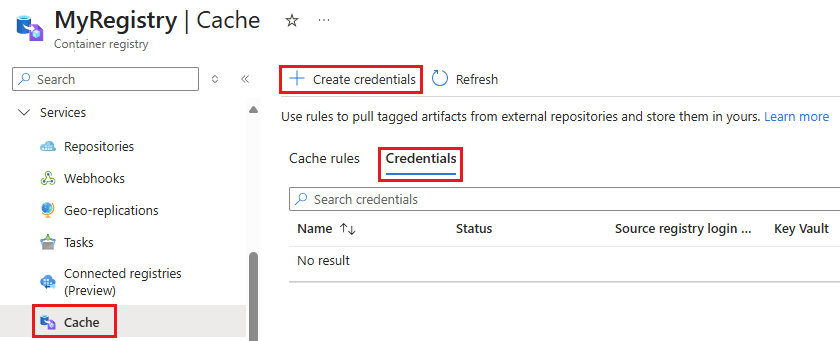
Before configuring the credentials, make sure you're able to create and store secrets in the Azure Key Vault and retrieve secrets from the Key Vault.
In your container registry's Cache pane, select Credentials, then select Create credentials.
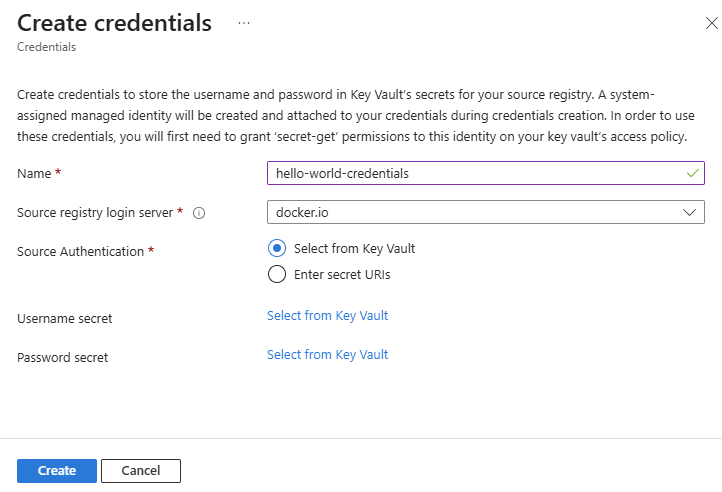
Enter a Name for the new credentials for your source registry.
Select a Source Authentication. Artifact cache currently supports Select from Key Vault and Enter secret URIs.
For the Select from Key Vault option, create your credentials using Key Vault.
Select Create.
Alternately, you can use Azure RBAC to assign the Key Vault Secrets User role (or a custom role that includes the Microsoft.KeyVault/vaults/secrets/getSecret/action permission) to the system identity.
Azure Container Registry Artifact Cache enforces a fixed allow‑list of supported upstream registries as documented on Microsoft Learn. Since dhi.io is not included in the supported upstream registry list, it is treated as an unsupported login server and rejected during validation. Even though Docker owns dhi.io, it is a separate registry endpoint and is not equivalent to docker.io. Direct caching from dhi.io is therefore not supported today.
“Optimize image pulls with artifact cache in Azure Container Registry” https://learn.microsoft.com/en-us/azure/container-registry/artifact-cache-overview
Under the “Upstream support” section, Microsoft explicitly states:
Artifact cache currently supports the following upstream registries:
docker.io
mcr.microsoft.com
quay.io
public.ecr.aws
ghcr.io
nvcr.io
registry.k8s.io
gcr.io
ecr.*
pkg.dev
This is the exact allow‑list enforced by ACR Artifact Cache validation
Currently only a limited set of upstream registries are supported… There is no option to configure arbitrary registries as upstream. https://github.com/Azure/acr/issues/849
Links :
https://learn.microsoft.com/en-us/azure/container-registry/artifact-cache-portal
Assign Azure roles using the Azure portal
Grant permission to applications to access an Azure Key Vault using Azure RBAC.
Thanks,
Manish Deshpande.