Developer technologies | .NET | Xamarin
A Microsoft framework for building cross-platform mobile apps using .NET and C# with native performance and user interfaces.
This browser is no longer supported.
Upgrade to Microsoft Edge to take advantage of the latest features, security updates, and technical support.
' cx='32' cy='32' r='32' /%3E%3Ctext x='50%25' y='55%25' dominant-baseline='middle' text-anchor='middle' fill='%23FFF' %3ENG%3C/text%3E%3C/svg%3E)
Hi all,
My app not installing in release mode, Even I tried generating apk and installing but app is crashing every time.
I'm getting following error
Start debugging Android application failed
Start debugging Android application ...
am start -a "android.intent.action.MAIN" -c "android.intent.category.LAUNCHER" -n "com.test.demo/crc6409718adb1cab00c7.SplashActivity"
Starting: Intent { act=android.intent.action.MAIN cat=[android.intent.category.LAUNCHER] cmp=com.test.demo/crc6409718adb1cab00c7.SplashActivity }
Error type 3
Error: Activity class {com.test.demo/crc6409718adb1cab00c7.SplashActivity} does not exist.
The application could not be started. Ensure that the application has been installed to the target device and has a launchable activity (MainLauncher = true).
Additionally, check Build->Configuration Manager to ensure this project is set to successfully
for this configuration.
Start debugging Android application failed
A Microsoft framework for building cross-platform mobile apps using .NET and C# with native performance and user interfaces.
' cx='32' cy='32' r='32' /%3E%3Ctext x='50%25' y='55%25' dominant-baseline='middle' text-anchor='middle' fill='%23FFF' %3EA%3C/text%3E%3C/svg%3E)
Please set MainActivity as MainLauncher = true, then generate a apk, if you have same issue.
Hi @Anonymous
Thanks for your response,
I'm getting this issue only for Andoid11 Devices only
I'm targeting to android11 also
Did you test it in android emulator? Is that worked?
' cx='32' cy='32' r='32' /%3E%3Ctext x='50%25' y='55%25' dominant-baseline='middle' text-anchor='middle' fill='%23FFF' %3EA%3C/text%3E%3C/svg%3E)
I came across this error due to carelessness. I set up a pin code and fingerprint on the emulator. And I tried to deploy the application without unlocking the device and received this error
' cx='32' cy='32' r='32' /%3E%3Ctext x='50%25' y='55%25' dominant-baseline='middle' text-anchor='middle' fill='%23FFF' %3EDT%3C/text%3E%3C/svg%3E)
The comment above is correct - you must unlock the Emulator with a PIN before Visual Studio can deploy the app
' cx='32' cy='32' r='32' /%3E%3Ctext x='50%25' y='55%25' dominant-baseline='middle' text-anchor='middle' fill='%23FFF' %3ERG%3C/text%3E%3C/svg%3E)
This happened to me as well when manually uninstalling the app and re-deploying it via VS.
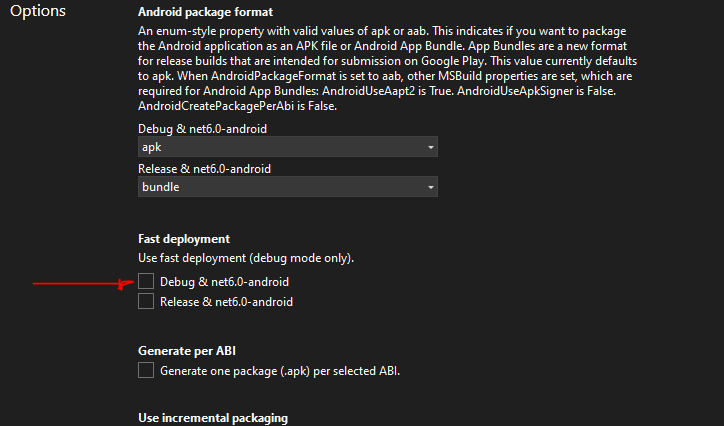
The solution is to turn off "fast deployment" in the project settings - Options
' cx='32' cy='32' r='32' /%3E%3Ctext x='50%25' y='55%25' dominant-baseline='middle' text-anchor='middle' fill='%23FFF' %3ERP%3C/text%3E%3C/svg%3E)
' cx='32' cy='32' r='32' /%3E%3Ctext x='50%25' y='55%25' dominant-baseline='middle' text-anchor='middle' fill='%23FFF' %3EJV%3C/text%3E%3C/svg%3E)
I cannot find this Fast deployment setting option in VS22
' cx='32' cy='32' r='32' /%3E%3Ctext x='50%25' y='55%25' dominant-baseline='middle' text-anchor='middle' fill='%23FFF' %3EM%3C/text%3E%3C/svg%3E)
I got this error while trying out a new MAUI project. My first deployment (through VS) went ok, and the application was functioning fine.
It's when I uninstalled the app manually from my device, and then tried to redeploy it with VS that I started to get this error.
XA0137: The 'run-as' command failed with 'run-as: couldn't stat /data/user/0/com.companyname.mauiappshell: No such file or directory
The only way that I could bypass this deployment error was to manually rename the ApplicationId from within the MAUI project file.
So, if your application id is like
<ApplicationId>com.companyname.appname</ApplicationId>
rename it to something like
<ApplicationId>com.companyname.1.appname</ApplicationId>
and try to re-deploy the app to your device.
Hope this will help!