Developer technologies | .NET | Blazor
A free and open-source web framework that enables developers to create web apps using C# and HTML, developed by Microsoft.
This browser is no longer supported.
Upgrade to Microsoft Edge to take advantage of the latest features, security updates, and technical support.
' cx='32' cy='32' r='32' /%3E%3Ctext x='50%25' y='55%25' dominant-baseline='middle' text-anchor='middle' fill='%23FFF' %3ED%3C/text%3E%3C/svg%3E)
Anyone managed to create a JS interop for https://github.com/mozilla/pdf.js
I am looking for robust viewer solution to show PDF files.
Thank you,
D
A free and open-source web framework that enables developers to create web apps using C# and HTML, developed by Microsoft.
' cx='32' cy='32' r='32' /%3E%3Ctext x='50%25' y='55%25' dominant-baseline='middle' text-anchor='middle' fill='%23FFF' %3ESA%3C/text%3E%3C/svg%3E)
HI,
Did you ever have any luck finding this for Blazor?
Thanks,
Santy
' cx='32' cy='32' r='32' /%3E%3Ctext x='50%25' y='55%25' dominant-baseline='middle' text-anchor='middle' fill='%23FFF' %3EA%3C/text%3E%3C/svg%3E)
Has any body successful implemented pdfjs in a Blazor App for all pdf sizes?
What are the steps to do so?
This works great for small pdf's, but unfortunately there's a limit on the Base64 in the browsers. When I try the example with a 2.21MB file it doesn't load.
' cx='32' cy='32' r='32' /%3E%3Ctext x='50%25' y='55%25' dominant-baseline='middle' text-anchor='middle' fill='%23FFF' %3EBS%3C/text%3E%3C/svg%3E)
The blazor code should define the canvas. The using the sample
https://mozilla.github.io/pdf.js/examples/index.html#interactive-examples
Create a JavaScript file that is included that has a public method blazor interop can call passing the url.
Note: blazor could make the ajax call but it’s more efficient for the JavaScript to do. After all webclient will call JavaScript anyway. Even if blazor server, you would need to use base64 encoded pdf which would make the payload larger.
Hi @DinoN
The easiest way is to use the following method is to display the pdf file.
Method 1
Use iframe with below code. And the url is http://docs.google.com/gview?url=http://yourwebapp/file1.pdf&embedded=true.

It works on my side.
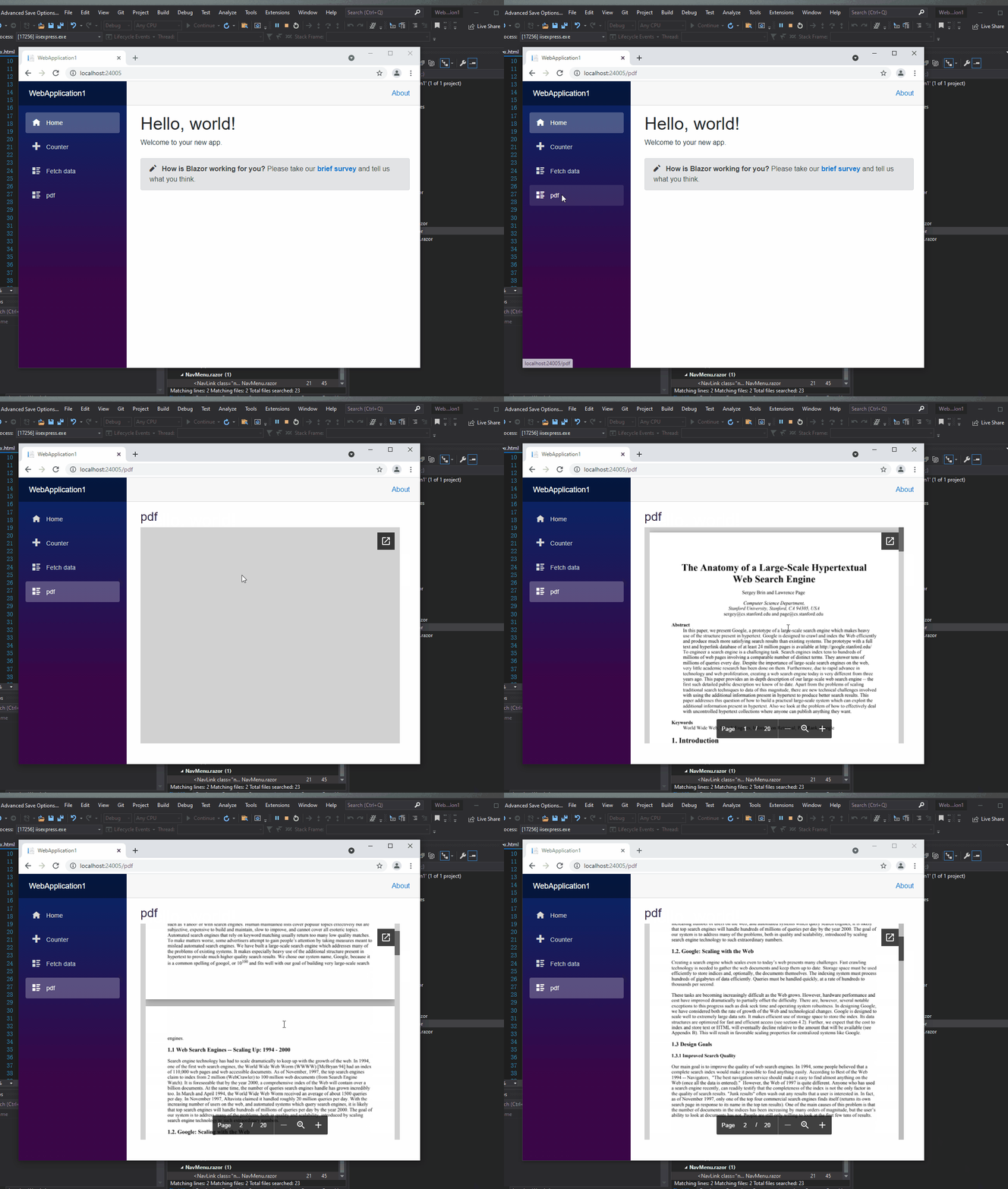
Method 2
You can refer to official doc about pdf.js. It will useful to you.
How to Embed a PDF in an HTML Website
If the answer is helpful, please click "Accept Answer" and upvote it.
Note: Please follow the steps in our documentation to enable e-mail notifications if you want to receive the related email notification for this thread.
Best Regards,
Jason
' cx='32' cy='32' r='32' /%3E%3Ctext x='50%25' y='55%25' dominant-baseline='middle' text-anchor='middle' fill='%23FFF' %3EN%3C/text%3E%3C/svg%3E)
Did you manage to get it to go 100% high, specially in a blazor app? I've tried lots of AI suggestions but none work.
I also can't get pdf.js to work in blazor.