Exchange | Exchange Server | Management
The administration and maintenance of Microsoft Exchange Server to ensure secure, reliable, and efficient email and collaboration services across an organization.
This browser is no longer supported.
Upgrade to Microsoft Edge to take advantage of the latest features, security updates, and technical support.
' cx='32' cy='32' r='32' /%3E%3Ctext x='50%25' y='55%25' dominant-baseline='middle' text-anchor='middle' fill='%23FFF' %3EES%3C/text%3E%3C/svg%3E)
Exchange 2013 CU23
After login to OWA or ECP, I encountered http code 500.
Before that, I was updated security update KB5004778 (after a few failed attempts).
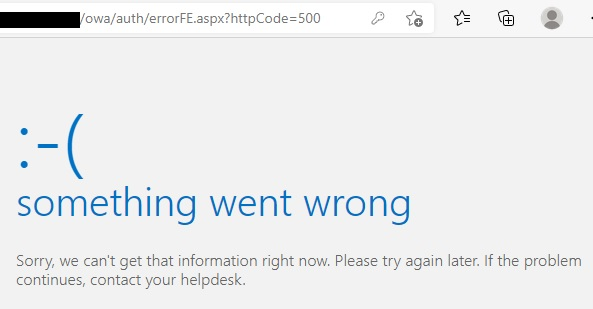
I followed "OWA or ECP stops working after you install a security update" but failed.
https://learn.microsoft.com/en-us/exchange/troubleshoot/client-connectivity/owa-stops-working-after-update
I run security update KB5004778 again without any issue.
But I still got http code 500.
Please advise, thanks.
The administration and maintenance of Microsoft Exchange Server to ensure secure, reliable, and efficient email and collaboration services across an organization.
' cx='32' cy='32' r='32' /%3E%3Ctext x='50%25' y='55%25' dominant-baseline='middle' text-anchor='middle' fill='%23FFF' %3EDS%3C/text%3E%3C/svg%3E)
After installing updates kb5004778
https://mail.ourexchange.com/owa/auth/errorFE.aspx?httpCode=500
X-ClientId: SSLX - LPN0 - IOTY - WLWHQW
X-FEServer: MAIL
Date: 19.07.2021 11:19:36
' cx='32' cy='32' r='32' /%3E%3Ctext x='50%25' y='55%25' dominant-baseline='middle' text-anchor='middle' fill='%23FFF' %3EKY%3C/text%3E%3C/svg%3E)
Hi @EM Support
Sorry I need to add the following questions to get some more information:
And was the detailed HTTP 500 error message "HMACProvider.GetCertificates:protectionCertificates.Length<1"?
If it is the case, this issue may be caused by the OAuth certificate is missing or expired.

Please run this command to first check if the OAuth certificate is missing or expired:
Get-ExchangeCertificate (Get-AuthConfig).CurrentCertificateThumbprint
If there is no result returned or the OAuth certificate has expired, please follow this link to create a new OAuth certificate and see if it can get rid of the problem.
If the response is helpful, please click "Accept Answer" and upvote it.
Note: Please follow the steps in our documentation to enable e-mail notifications if you want to receive the related email notification for this thread.
Hi @EM Support
I am writing here to confirm with you how thing going now?
Did the issue get resolved?
' cx='32' cy='32' r='32' /%3E%3Ctext x='50%25' y='55%25' dominant-baseline='middle' text-anchor='middle' fill='%23FFF' %3EMM%3C/text%3E%3C/svg%3E)
KaelYao,
I am having a similar issue with my exchange environment? Any way we can connect somehow?
Hi,
Sorry but here we mainly focus on supporting via forum posts.
If your issue is very urgent, please consider opening a support ticket via phone.
You can get the numbers in this link: Global Customer Service phone numbers
Besides, did the recreating new OAuth certificate solution not work for you?

Can you check, if the bindings are assigned correctly in IIS console for both websites (Default website and Exchange Backend)
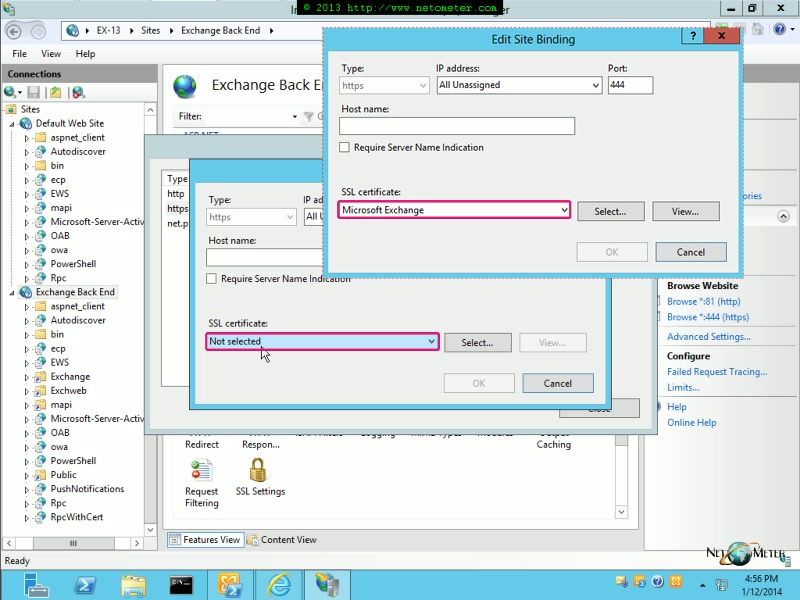
I have tried to create new certificate but still unable to access OWA or ECP.
https://learn.microsoft.com/en-us/exchange/troubleshoot/client-connectivity/owa-ecp-ems-cannot-connect-after-self-signed-certificate-removed
Against each 443 bindings, make sure that you have the right certificates assigned. Are you using thirdparty SSL? is it expired or still valid?
What about the expiry conditions of other certificates?
Few other checks. Looks like you have fixed something else during the installation (as you mentioned in the initial question).
yes, self-signed certificate for 443 bindings. Not thirdparty SSL.
Still valid, up to 2023.
1) yes, CU23 installed on 2019.
2) Exchange Server version is 15.00.1497.023
3) i have checked it, installation completed without error.
4) All Exchange services are running.
5) i still checking the event logs.
Solution2:
after clear values of msExchCanaryData0, msExchCanaryData1 and msExchCanaryData2 and recycle MSExchangeOWAAppPool, does msExchCanaryData0 to 2 filled with values?
' cx='32' cy='32' r='32' /%3E%3Ctext x='50%25' y='55%25' dominant-baseline='middle' text-anchor='middle' fill='%23FFF' %3EGB%3C/text%3E%3C/svg%3E)
I also have the same issue. I tried to run the command, it returned a thumbprint. Servercis: only S listed
I have checked the binding, seems correct. Default website has the usuale certificate, while backend has no certificate assigned
' cx='32' cy='32' r='32' /%3E%3Ctext x='50%25' y='55%25' dominant-baseline='middle' text-anchor='middle' fill='%23FFF' %3EAM%3C/text%3E%3C/svg%3E)
The Microsoft Exchange Server Auth Certificate got pointed to a wrong expired one, causing this issue.
To fix it first, check whether the Auth certificate using the below command. If it's not pointed to the correct one, then it needs to be replaced with the correct one.
Get-ExchangeCertificate (Get-AuthConfig).CurrentCertificateThumbprint
To replace the correct certificate :
Set-AuthConfig -NewCertificateThumbprint <correctMSAuththumprint> -NewCertificateEffectiveDate (Get-Date)
Set-AuthConfig -PublishCertificate
Set-AuthConfig -ClearPreviousCertificate
' cx='32' cy='32' r='32' /%3E%3Ctext x='50%25' y='55%25' dominant-baseline='middle' text-anchor='middle' fill='%23FFF' %3EC%3C/text%3E%3C/svg%3E)
Thanks for posting this. It was spot on. Appears that the patch changes the Auth certificate for some reason. To resolve this issue, we did the following:
Get-ExchangeCertificate
3.. Look for the auth certificate on your exchange server and get the thumbprint of that certificate. Output of the Get-ExchangeCertificate follows:
Thumbprint Subject
7F7B8143A318C4E93796099E53D9D748F2FE0xxx CN=Microsoft Exchange Server Auth Certificate
Set-AuthConfig -NewCertificateThumbprint 7F7B8143A318C4E93796099E53D9D748F2FE0xxx -NewCertificateEffectiveDate (Get-Date)
Set-AuthConfig -PublishCertificate
Set-AuthConfig -ClearPreviousCertificate
' cx='32' cy='32' r='32' /%3E%3Ctext x='50%25' y='55%25' dominant-baseline='middle' text-anchor='middle' fill='%23FFF' %3ESE%3C/text%3E%3C/svg%3E)
' cx='32' cy='32' r='32' /%3E%3Ctext x='50%25' y='55%25' dominant-baseline='middle' text-anchor='middle' fill='%23FFF' %3EGD%3C/text%3E%3C/svg%3E)
It worked for me.
--> Restart is required.