Hello DowntownJB04,
Thank you for posting in the community.
Based on the information provided, it seems the primary issue is that your Outlook application is opening in offline mode. When Outlook operates offline, it cannot sync with your email server, which explains why your past emails aren't appearing or accessible. This is a common issue when the application is disconnected from the server.
To investigate further, could you kindly provide the following information:
- You mentioned using a school email account. Can you confirm if this email is set up with Microsoft 365 Exchange, IMAP, or POP?
- Please share the email account details in private message.
- Could you confirm that your school email license has not expired yet?
- Please share a screenshot of the current Office version you're using. You can follow these steps to find this information: About Office: What version of Office am I using? - Microsoft Support
- Share a screenshot of the version number you're currently using? (You can check the version by following this guide: What version of Outlook do I have? - Microsoft Support
- Please try to access your school email through Outlook on the web (https://outlook.office365.com/). Please let me know your emails are visible and accessible there.
- When you open the Outlook desktop app, do you notice any indication that it’s in Offline Mode, such as a "Working Offline" status in the bottom-right corner of the app? Please share a screen shot indicating that it is opening in offline mode.
- Have you tried manually switching Outlook from Offline Mode to Online Mode? If so, were you able to sync or retrieve your past emails?
- Have you attempted to access your school email on a different device such as Outlook application for windows? If so, was the issue still present?
**Please note that my initial response may not resolve your current situation immediately. However, with your help and more detailed information, we can work together to find a particular direction of your current situation. ======================================================================== Note:**Please keep in mind that this is a public forum, so don't publicly share sensitive information in your feed, such as email addresses or business details. According to the forum policy, to protect sensitive information, please share the requested information with me in "View Private Messages".
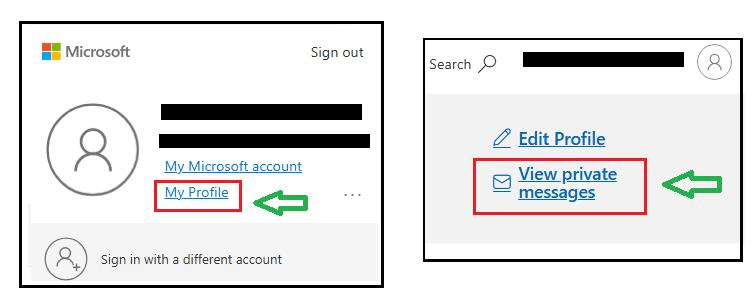
Here are the steps to enable the display of private messages:
To view the private message option> sign in to the Microsoft community, use your email account where you posted this topic in the Microsoft community, click the profile picture > in the upper-right corner, > select the My profile option.
 https://learn-attachment.microsoft.com/api/attachments/966bf9e4-96ce-44c1-ac9b-80b76f915c5a?platform=QnA
' cx='32' cy='32' r='32' /%3E%3Ctext x='50%25' y='55%25' dominant-baseline='middle' text-anchor='middle' fill='%23FFF' %3EA%3C/text%3E%3C/svg%3E)
