Exchange Online
A cloud-based service included in Microsoft 365, delivering scalable messaging and collaboration features with simplified management and automatic updates.
This browser is no longer supported.
Upgrade to Microsoft Edge to take advantage of the latest features, security updates, and technical support.
' cx='32' cy='32' r='32' /%3E%3Ctext x='50%25' y='55%25' dominant-baseline='middle' text-anchor='middle' fill='%23FFF' %3EL%3C/text%3E%3C/svg%3E)
Hello, I am using the New-MailboxImportRequest to import .PST files into existing mailboxes. These mailboxes have emails in them that are also included in the .PST file being imported. The import request completes successfully, some needing the BadItemLimit to be set. After importing the .PST file, I am noticing that duplicates have been created for emails and contacts. From this site, https://learn.microsoft.com/en-us/powershell/module/exchange/new-mailboximportrequest?view=exchange-ps I understand that duplicates are not imported. This is an example of the PowerShell command used: New-MailboxImportRequest -FilePath "\ServerName\FolderLocation\UserName.pst" -BadItemLimit 10 -Mailbox "UserName"
This is an on premiss Exchange 2016 server.
So, to my questions, How do I stop the duplicates from being imported? And How do I remove the duplicates for those already imported?
A cloud-based service included in Microsoft 365, delivering scalable messaging and collaboration features with simplified management and automatic updates.
The administration and maintenance of Microsoft Exchange Server to ensure secure, reliable, and efficient email and collaboration services across an organization.
The administration of a hybrid deployment that connects on-premises Exchange Server with Exchange Online, enabling seamless integration and centralized control.
Locked Question. You can vote on whether it's helpful, but you can't add comments or replies or follow the question.

I think there exist copy in the PST file that you used to import. I would suggest you have a check about it before importing.
By default, the import will could merger PST file with target mailbox.
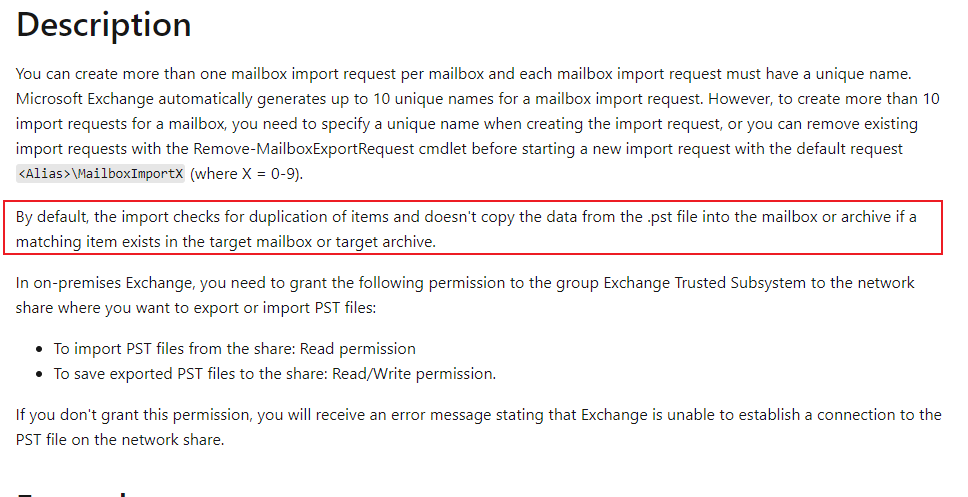
Based on my testing, if there exist duplicate in the PST file, the import operation will not delete the duplicate from target mailbox.
Such as:
As a solution, you can use the Outlook "Clean Up“ function to delete all duplicates from this mailbox directly:
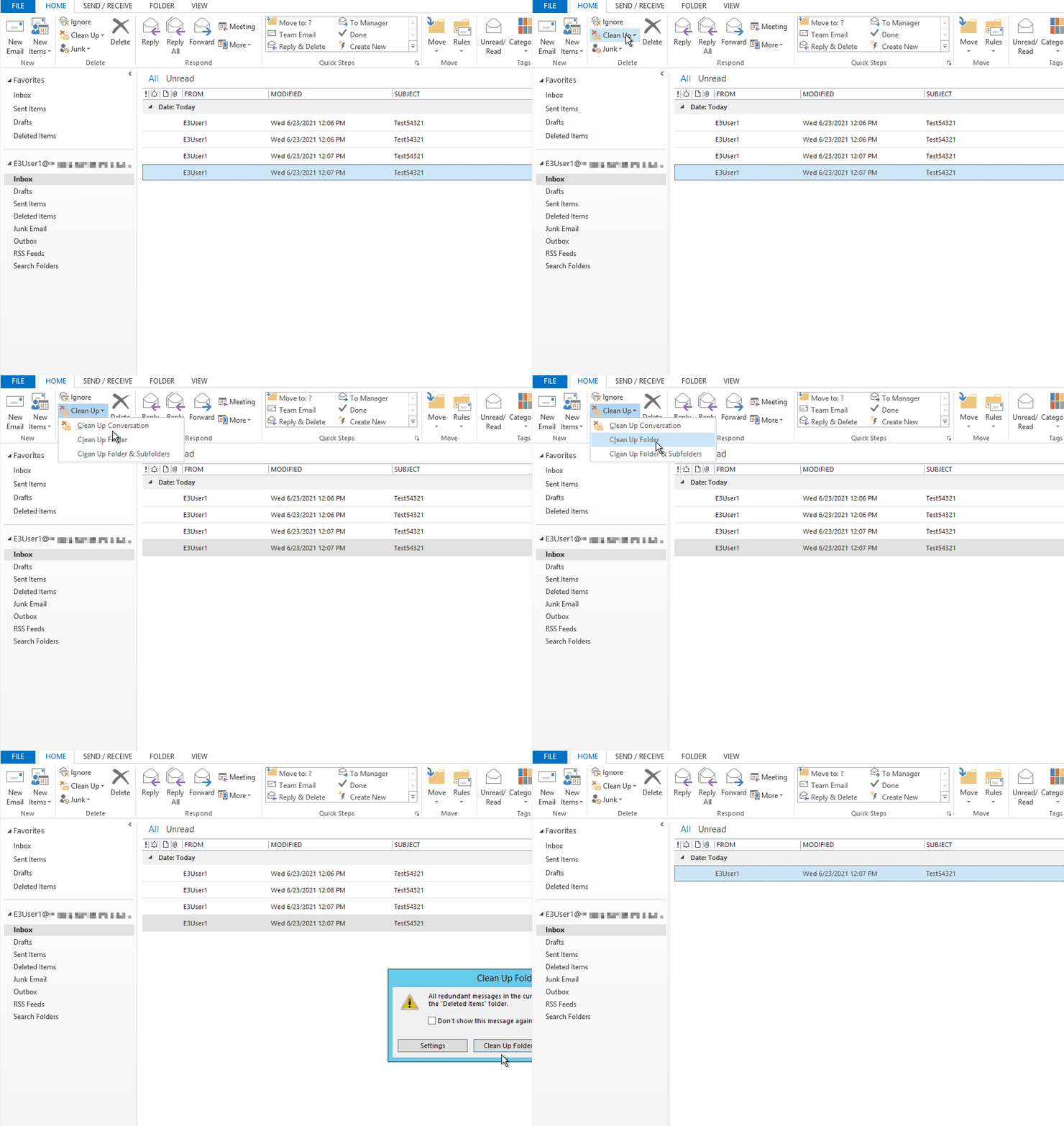
If the response is helpful, please click "Accept Answer" and upvote it.
Note: Please follow the steps in our documentation to enable e-mail notifications if you want to receive the related email notification for this thread.
' cx='32' cy='32' r='32' /%3E%3Ctext x='50%25' y='55%25' dominant-baseline='middle' text-anchor='middle' fill='%23FFF' %3ETM%3C/text%3E%3C/svg%3E)
This is normal behavior from your description. The old database had 1 name the new database had another. The database name is part of the metadata for the message. So you created an empty mailbox, restored from backup, which put 1 copy of a message into the new database and restored from pst which put another copy in. So either 1 of 2 things happened. First veem backup/restore was being helpful by changing the name of the metadata to the new name during it's import and the import from pst via powershell was not, so the server saw these as not duplicates. Second, veem restore didn't change the metadata of the database name, but the outlook pst file didn't have the database name in it's metadata and so the powershell import added the new database name as part of the metadata.
The basic takeaway here is you cannot trust imports/exports from psts from either different sources or using different tools to not gracefully handle conflicts. The most common example often cited is importing a pst file created by powershell export on an old mailserver to a new mailserver, then importing a pst created by export from an .ost file into a .pst file that covers the same date range. Remember that the .pst file format has never been "officially" documented by Microsoft, and the only 2 known tools out there that create .pst files are Outlook, and the API's within exchange that are used by some backup/restore tools that have the capability of restoring from backup into a pst, and by the powershell import/export commands. All the backup/restore tools I have ever seen that can "create" pst's depend on hacks like loading outlook on the machine you are running the backup restore tool from or having an exchange server somewhere (such as the target) so they clearly are using APIs inside of Outlook or in Exchange to create the PST
@KyleXu-MSFT
Thanks for your suggestions.
I can confirm there is only 1 email in the .pst file used during the import process. After the import, there are 2 showing in the mailbox.
The Outlook Clean Up function is not removing the duplicated emails, both are still present.
I have checked this with multiple PST files and mailboxes.
The 2 emails in the mailbox show the same time and date, they both have the same content.
Checking the Internet Headers for the duplicated emails shows both are the same.
It sounds weird, I would confirm more information with you:
II think this phenomenon may related with the way that you export data. If you export data from mailbox A, then import A again, whether this phenomenon occurs?
@KyleXu-MSFT
Thanks again for your response.
Some background first, the Exchange database became corrupted. A new empty database was created to allow email access and flow. Some users had cached Exchange mode enabled prior to the database corruption. These cached emails were exported to .pst using Outlook. These locally exported .pst files were then imported into the empty Exchange database and respective mailbox. Some users had only 3 months, while some had longer periods cached.
To answer your questions:
I think the export tool change the attributes of emails, then Exchange import command think those emails are different from original emails. So, duplicates occurs.
A little doubt: since database broken, why there still exist emails in mailbox? Since there exist emails in mailbox, why do you import data again? I would suggest you empty mailbox, then import just once.
@KyleXu-MSFT
No further progress. Emptying the mailbox and then importing is not possible. There are current emails in the mailbox, as I have many this is happening too I am not able to follow this process.