We are using Windows 10 (1909 and 20H2) with SCCM 2010 (and a Cloud Management Gateway for remote machines) and are moving to using Defender and managing it with SCCM. We use SCCM Endpoint Protection Policies to deploy Antimalware policy to machines.
In the Antimalware policy, we enable the option to Block potentially unwanted applications. However, the Windows Security icon is showing an exclamation mark, and if we open Windows Security, under App & browser control, we see a warning that "The setting to block unwanted apps is turned off".
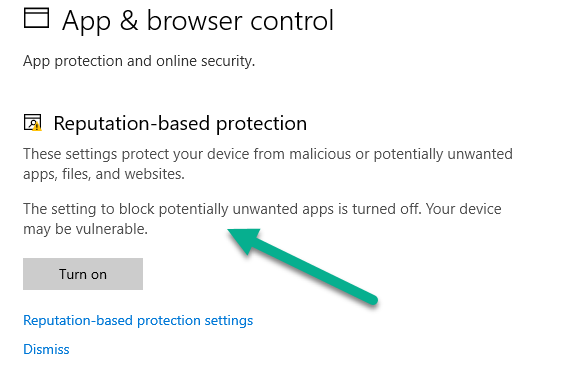
If we click Reputation-based protection settings, we see that Block Apps is enabled, but Block Downloads is not enabled.
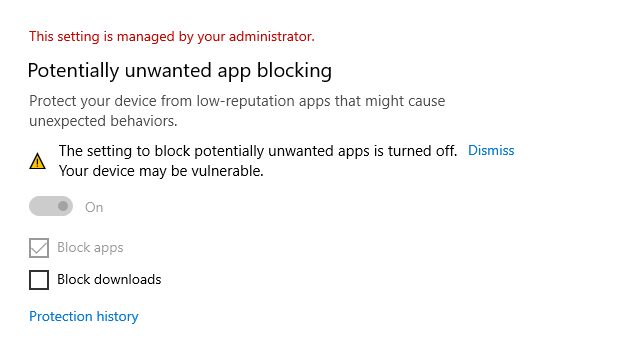
The only way to get the exclamation mark warning to go away is to select Block Downloads or click Dismiss, and doing so means having to provide admin credentials (our users do not have local admin rights on their machines). As we are migrating to Defender on over 4000 machines, it is not practical to login to each machine to remove this warning, especially seeing as 90% of our machines are currently working remotely.
The only way I can think of enabling the Block Downloads option on all machines would be to use a group policy (a group policy isn't really a valid option for me, as most of our machines do not have VPN access so I can't reliably use GPOs at the moment), a registry file, or a powershell command. All my research and testing has shown that making changes to PUA (Potentially unwanted Applications) with registry, GPO or powershell only seems to affect the Block Apps setting. I read that the Block Downloads setting is controlled in Edge settings, so how can I enable this setting machine wide using a registry setting or powershell command ?
' cx='32' cy='32' r='32' /%3E%3Ctext x='50%25' y='55%25' dominant-baseline='middle' text-anchor='middle' fill='%23FFF' %3ERH%3C/text%3E%3C/svg%3E)

' cx='32' cy='32' r='32' /%3E%3Ctext x='50%25' y='55%25' dominant-baseline='middle' text-anchor='middle' fill='%23FFF' %3EA%3C/text%3E%3C/svg%3E)
' cx='32' cy='32' r='32' /%3E%3Ctext x='50%25' y='55%25' dominant-baseline='middle' text-anchor='middle' fill='%23FFF' %3EJR%3C/text%3E%3C/svg%3E)
' cx='32' cy='32' r='32' /%3E%3Ctext x='50%25' y='55%25' dominant-baseline='middle' text-anchor='middle' fill='%23FFF' %3ER%3C/text%3E%3C/svg%3E)
' cx='32' cy='32' r='32' /%3E%3Ctext x='50%25' y='55%25' dominant-baseline='middle' text-anchor='middle' fill='%23FFF' %3EM%3C/text%3E%3C/svg%3E)

' cx='32' cy='32' r='32' /%3E%3Ctext x='50%25' y='55%25' dominant-baseline='middle' text-anchor='middle' fill='%23FFF' %3EB%3C/text%3E%3C/svg%3E)
' cx='32' cy='32' r='32' /%3E%3Ctext x='50%25' y='55%25' dominant-baseline='middle' text-anchor='middle' fill='%23FFF' %3ED%3C/text%3E%3C/svg%3E)
' cx='32' cy='32' r='32' /%3E%3Ctext x='50%25' y='55%25' dominant-baseline='middle' text-anchor='middle' fill='%23FFF' %3EBG%3C/text%3E%3C/svg%3E)
' cx='32' cy='32' r='32' /%3E%3Ctext x='50%25' y='55%25' dominant-baseline='middle' text-anchor='middle' fill='%23FFF' %3EJ%3C/text%3E%3C/svg%3E)