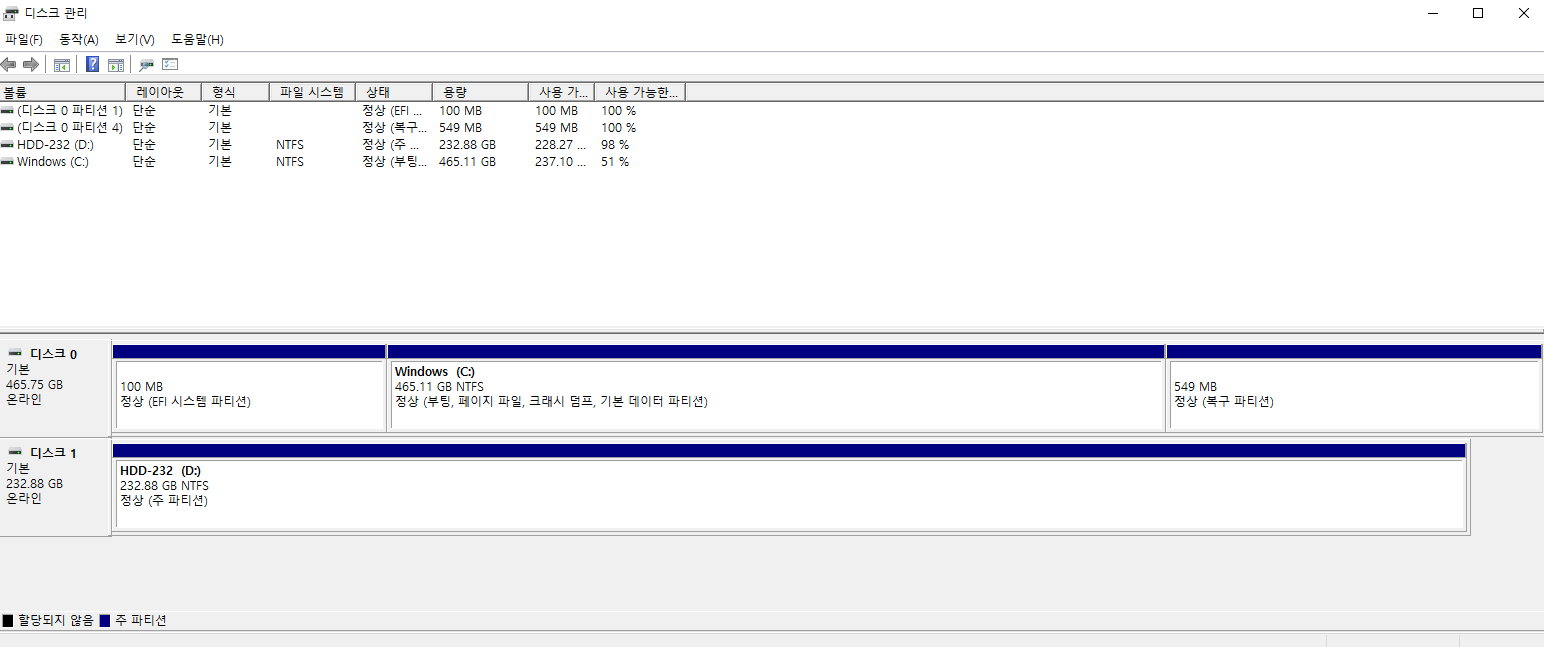
Hi, I'm still using Windows 10, and for some reason, my PC's E Drive (dunno if it's HDD or SSD) just had gone, as it follows on screenshot. There should be E Drive listed on the Disk Manager, but somehow it don't, and kind of becoming a problem as I've downloaded most of the programs on E Drive, cuz I've got only few hundreds of GB for the total volume of C Drive, and I'm wondering how to retrieve that unlisted driver. I even ran a command on cmd which is for checking if there is any problematic drivers in the PC, but wasn't detected at all. Can somebody please help me with the problem? (If I need to get into BIOS, then my desktop is running Windows 10 with AOC monitor)
' cx='32' cy='32' r='32' /%3E%3Ctext x='50%25' y='55%25' dominant-baseline='middle' text-anchor='middle' fill='%23FFF' %3EM%3C/text%3E%3C/svg%3E)


' cx='32' cy='32' r='32' /%3E%3Ctext x='50%25' y='55%25' dominant-baseline='middle' text-anchor='middle' fill='%23FFF' %3ECB%3C/text%3E%3C/svg%3E)
' cx='32' cy='32' r='32' /%3E%3Ctext x='50%25' y='55%25' dominant-baseline='middle' text-anchor='middle' fill='%23FFF' %3ESS%3C/text%3E%3C/svg%3E)