SQL Server Integration Services
A Microsoft platform for building enterprise-level data integration and data transformations solutions.
This browser is no longer supported.
Upgrade to Microsoft Edge to take advantage of the latest features, security updates, and technical support.
' cx='32' cy='32' r='32' /%3E%3Ctext x='50%25' y='55%25' dominant-baseline='middle' text-anchor='middle' fill='%23FFF' %3EJ%3C/text%3E%3C/svg%3E)
I have a simple ETL that is selecting columns from tables in one SQL Server database and inserting them into a table in another SQL Server db. The ODBC Source uses a SQL Query. The ODBC Destination is loading directly to the table. All is working perfectly, no error messages, except that the data is being inserted into the wrong columns in two cases.
The select: SELECT SerialNumber, IPAddress... loads the serial number into the IPAddress field in the destination and the IPAddress into the SerialNumber field.
The mapping tab is correct, as far as mapping SN to SN and IP to IP, but there is something odd about it. The destination table columns are not shown in the order they should be, i.e. the table's first column is SN and the second is IP, but the ODBC Destination mapping tab shows IP first and SN second. So when I map SN to SN I suspect that what I'm actually doing is mapping SN from the query to the second column of the table, which is actually IP (and vice versa). The columns are different length varchars, so I can switch the mapping and it'll work, but it will warn me that the data may not fit in the column due to the size difference. It would also be damn confusing for anyone trying to troubleshoot my code at some future date.
Any thoughts?
ENV:
Visual Studio 2019
SQL Server 2016
A Microsoft platform for building enterprise-level data integration and data transformations solutions.
A family of Microsoft suites of integrated development tools for building applications for Windows, the web, mobile devices and many other platforms. Miscellaneous topics that do not fit into specific categories.
' cx='32' cy='32' r='32' /%3E%3Ctext x='50%25' y='55%25' dominant-baseline='middle' text-anchor='middle' fill='%23FFF' %3EYK%3C/text%3E%3C/svg%3E)
Please share more details about SSIS Data Flow in question.
' cx='32' cy='32' r='32' /%3E%3Ctext x='50%25' y='55%25' dominant-baseline='middle' text-anchor='middle' fill='%23FFF' %3EC%3C/text%3E%3C/svg%3E)
Hi, i had the same struggle since i realised, that it depends on the order of the columns in my query. I solved the Problem by creating a new query with the exact same columnorder of the sourcetable.
There are no create statements or transformations. This is a simple query and insert. I've attached a screenshot of the mapping tab and the resulting data in the database.
Everything works perfectly - except the data ends up in the wrong columns.

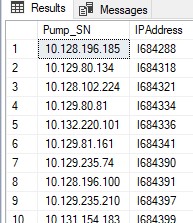
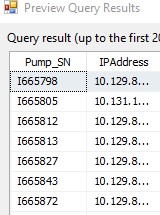
And to show I haven't mis-labeled the data - here's the preview: