Microsoft Security | Microsoft Graph
An API that connects multiple Microsoft services, enabling data access and automation across platforms

This browser is no longer supported.
Upgrade to Microsoft Edge to take advantage of the latest features, security updates, and technical support.
' cx='32' cy='32' r='32' /%3E%3Ctext x='50%25' y='55%25' dominant-baseline='middle' text-anchor='middle' fill='%23FFF' %3EJK%3C/text%3E%3C/svg%3E)
We are using bookings to schedule reoccurring appointments and all our settings are correct but our clients shared that all of a sudden there are appointment times that are unusual and like 6pm when we only have hours between 6:30am - 12:30pm. There are still appointment slots open between 6:30am - 12:30pm based on our calendar but are not showing. What can we do to rectify this issue?
An API that connects multiple Microsoft services, enabling data access and automation across platforms
' cx='32' cy='32' r='32' /%3E%3Ctext x='50%25' y='55%25' dominant-baseline='middle' text-anchor='middle' fill='%23FFF' %3EPC%3C/text%3E%3C/svg%3E)
The fix on my end was changing the 'Staff' Availability - unchecking the Outlook related box and deactivating 'Use business hours'! Was very frustrating double checking everything until I figured that out.
' cx='32' cy='32' r='32' /%3E%3Ctext x='50%25' y='55%25' dominant-baseline='middle' text-anchor='middle' fill='%23FFF' %3EGC%3C/text%3E%3C/svg%3E)
Hi @Jared Kawatani ,
Hope you are doing well.
In order to Address Microsoft Bookings related queries, it's suggested that you could post your case in dedicated forum for Microsoft Bookings for professional advice.
Hope this helps.
If the answer is helpful, please click Accept Answer and kindly upvote it. If you have any further questions about this answer, please click Comment.
' cx='32' cy='32' r='32' /%3E%3Ctext x='50%25' y='55%25' dominant-baseline='middle' text-anchor='middle' fill='%23FFF' %3EJM%3C/text%3E%3C/svg%3E)
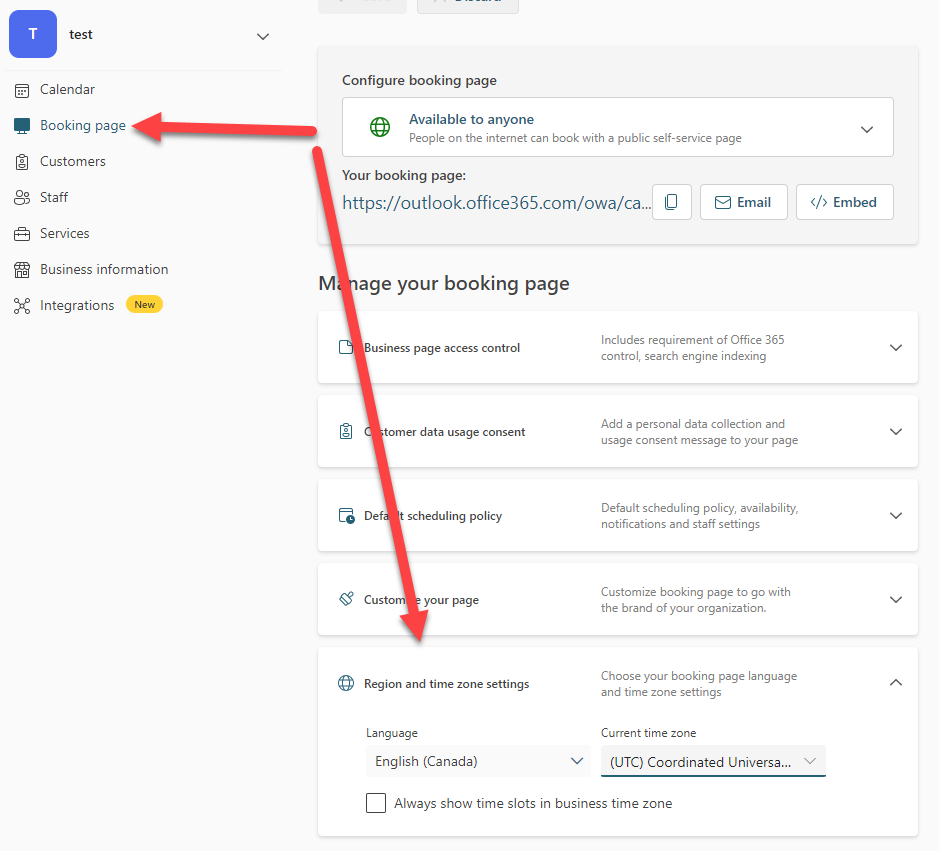
Have a look at your Region and time zone settings, I believe this will also determine how the time will display in the time slots for clients, especially if they're in a different time zone.
----------------------------------------------------------------------------------------------------------------------------------------------------------------------------------------------------------------------
Please accept this answer if it helped.