Microsoft 365 and Office | Access | Development
The creation and customization of database applications using Microsoft Access

This browser is no longer supported.
Upgrade to Microsoft Edge to take advantage of the latest features, security updates, and technical support.
' cx='32' cy='32' r='32' /%3E%3Ctext x='50%25' y='55%25' dominant-baseline='middle' text-anchor='middle' fill='%23FFF' %3EC%3C/text%3E%3C/svg%3E)
I am trying to bring up a form record based on text entered in a text box.
The form "Furnace + Header Data Form" is a parent form, with 2 subforms called "Header Data Form" and "Surrogate Data Form". This question is in relation to the "Header Data Form" subform.
The parent form is used to enter data on different furnace runs, which is connected to the table "Furnace Run Data". Each furnace run will have several headers in it, and each header has a serial number. I added a subform called "Header Data Form", which will allow the user to enter information specific to each header serial number. Data that is entered into the "Header Data Form" subform adds data to the "Header Data" table and is connected to the furnace data table via the Furnace Run ID. The Furnace Run ID is on both the parent form and as an invisible field on the Header Data subform. All fields on the Header Data Form are connected to the Header Data Table.
As a side note, there is a button within this subform to add a new record. Once the button is clicked, a new record with the furnace data and header data is saved and the header data subform is cleared. When you enter more data into the header data form and click the add button, another line (with the same Furnace Run ID) will be added to the header data table. No data is added to the furnace table. This all works great. There are multiple records in the Header Data table for each Furnace Run ID.
Initially, I was trying to find the record based on a text field named "Header SN Field" on the subform named "Header Data Form". This text field is connected to the "Header SN" Field from the "Header Data" table. Upon clicking the search button (on the Header Data subform), I wanted to use the text typed into the Header SN Field to search for the previous record in the Header Data table that has Header SN (field in Header Data table) = Header SN Field (field in form where user enters text). I could get this to run with no errors, but I kept getting the message saying that no matching record was found, even though there definitely is an existing record with the matching Header SN. My code for this is below.
Private Sub Search_SN_Button_Click()
If ([Header SN Placeholder] & vbNullString) = vbNullString Then Exit Sub
Dim strCriteria As String
Dim rs As DAO.Recordset
Set rs = Me.RecordsetClone

strCriteria = "[Header SN]='" & Me.[Header SN Field] & "'"

rs.FindFirst strCriteria

If rs.NoMatch Then
    MsgBox "Sorry, no such record '" & [Header SN Field] & "' was found.", _
           vbOKOnly + vbInformation
Else
    Me.Bookmark = rs.Bookmark
End If
rs.Close
txtGoTo = Null
End Sub
After searching a bit, I thought the solution might be to have a text box and search button on the main form instead. The text box on the main form is called "HeaderSN". I am still getting the message that there is no existing record that matches. My code for this is below.
Private Sub Search_Header_SN_Record_Click()
If (HeaderSN & vbNullString) = vbNullString Then Exit Sub
Dim strCriteria As String
Dim rs As DAO.Recordset
Set rs = Me.[Header Data Form].Form.RecordsetClone

strCriteria = "Header SN = '" & Me.HeaderSN & "'"

rs.FindFirst strCriteria

If rs.NoMatch Then
    MsgBox "Sorry, no such record '" & [HeaderSN] & "' was found.", _
           vbOKOnly + vbInformation
Else
    Me.[Header Data Form].Form.Bookmark = rs.Bookmark
End If
rs.Close
txtGoTo = Null
End Sub
Can someone please help me with this? I have tried a million different ways to do this and have been searching for days on different forums but I can't figure it out.
The creation and customization of database applications using Microsoft Access
An implementation of Visual Basic that is built into Microsoft products.
Locked Question. You can vote on whether it's helpful, but you can't add comments or replies or follow the question.
' cx='32' cy='32' r='32' /%3E%3Ctext x='50%25' y='55%25' dominant-baseline='middle' text-anchor='middle' fill='%23FFF' %3EMK%3C/text%3E%3C/svg%3E)
Set rs = Me.[Header Data Form].Form.RecordsetClone
strCriteria = "Header SN = '" & Me.HeaderSN & "'"
rs.FindFirst strCriteria
If rs.NoMatch Then
MsgBox "Sorry, no such record '" & [HeaderSN] & "' was found.", _

       vbOKOnly + vbInformation
Else
Me.[Header Data Form].Form.Bookmark = rs.Bookmark
End If
rs.Close
txtGoTo = Null
I tried this in my previous code when I was using the Findfirst instead of filtering. I get the error stating that Access can't find the field '1' referred to in your expression and highlighting line Set rs = Me.[Header Data Form.Form.RecordsetClone
Private Sub Search_SN_Button_Click()
If ([Header SN Field] & vbNullString) = vbNullString Then Exit Sub
Dim strCriteria As String
Dim rs As DAO.Recordset
strCriteria = Me![Header SN]

Debug.Print "Criteria:", strCriteria

Set rs = Me.[Header Data Form].Form.RecordsetClone
Dim i As Long

For i = 0 To rs.Fields.Count - 1
    Debug.Print rs.Fields(i).Name,
Next
rs.MoveFirst
Do Until rs.EOF
    Debug.Print
    For i = 0 To rs.Fields.Count - 1
        Debug.Print rs.Fields(i).Value,
    Next
    rs.MoveNext
Loop

rs.FindFirst "[Header SN] = '" & strCriteria & "'"
If rs.NoMatch Then
MsgBox "Sorry, no such record '" & [Header SN Field] & "' was found.", _
vbOKOnly + vbInformation
Else
Me.Bookmark = rs.Bookmark
End If
rs.Close
txtGoTo = Null
End Sub

Is Header Data Form the name of the subform control, or of the control's source object? Note that both might or might not have the same name. It should be the name of the subform control in the parent form's Controls collection.
@Ken Sheridan I have attached a few screenshots of my setup. I believe the name of the subform control is Header Data Form, as well as the name of the source object.
Would the bookmark example be included in the first examples that you sent? Or do the first 2 examples need to be changed to be used for a button/text box on the subform? I am a bit confused where each example should be used
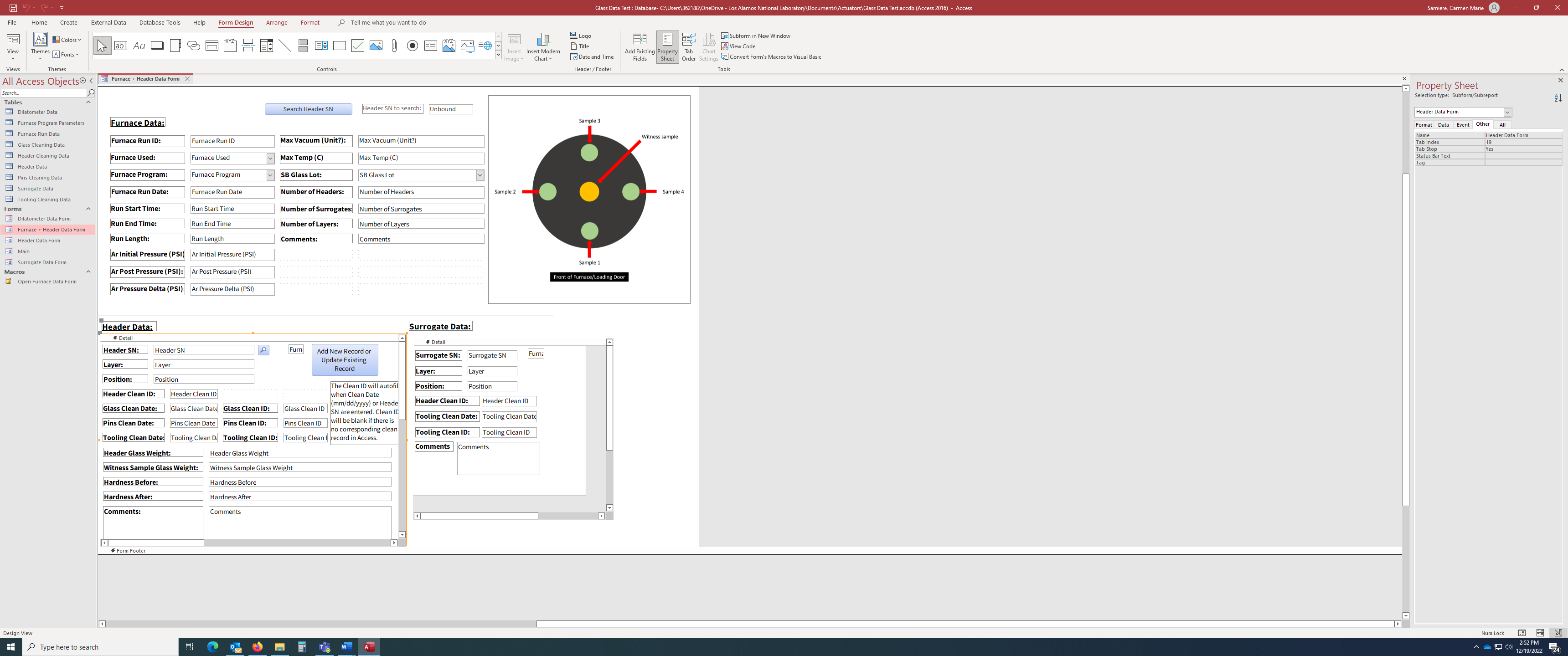
You'll find the Name property of the subform control on the Other tab of its properties sheet.
Both examples in my demo use a control on the parent form. The difference is that the second filters the subform as well as the parent form, while the first navigates to the matching record in the subform.
If you wanted to change it to use an unbound control in the subform then the code would in essence be the same, but each reference to the form in the combo box's After Update event procedure would be changed to a reference to Me.Parent, and in the code in the subform's Current event procedure would be changed to reference to Me. The Me keyword actually returns a reference to the current instance of the class in which the code is executing, but think of it as a shorthand way of refereeing to the current form or subform.
One other point I'd mention is that trying to use the same control as a bound control and a navigational control, as you mentioned earlier, is not a good idea. For a navigational control use an unbound control. You can synchronize this with the current record in the form's Current event procedure. The first option in my FindRecord demo does this. So you could omit the corresponding bound control(s), but you'd then have to include a mechanism to insert a value when entering a new record in the form.
Thank you for all the help! A few follow up questions...
The name of the subform control is Header Data Form, why do I get the error in my previous question (when bound text and button are on the subform) ?
I have changed the code for the button on my subform to match your findrecord example but use Me.Parent (see below), but I still get the same issue when I had the text box and button on the main form - it updates the parent form to the record that matches that in the text box, but the subform remains blank. Is the current event procedure what would update the sub form? Does the current event procedure and the after update procedure need to be separate? Can the bookmark action be in the after update (in my case, button click) procedure (as seen in the text before the End With statement)?
Private Sub Search_SN_Button_Click()
    Const MESSAGETEXT = "No matching records found."
     Dim ctrl As Control
     Dim strFilter As String

     Set ctrl = Me.[Header SN Placeholder]
        'Header SN Placeholder is not bound to the table, formula equals text entered in Header SN Field textbox on subform
     strFilter = "[Furnace Run ID] IN(SELECT [Furnace Run ID] " & _
         "FROM [Header Data] WHERE [Header SN] = """ & ctrl & """)"

     If Nz(ctrl, 0) = 0 Then
         ' turn off filter
         Me.Parent.FilterOn = False
         Me.Parent.[Header Data Form].Form.FilterOn = False
     Else
         If Not IsNull(DLookup("[Header SN]", "[Header Data]", "[Header SN] = '" & ctrl & "'")) Then
             ' filter form to name selected in text box
             Me.Parent.Filter = strFilter
             Me.Parent.FilterOn = True

             ' filter subform to selected Header SN
             With Me.Parent.[Header Data Form].[Form]
               .Filter = "[Header SN] = '" & ctrl & "'"
               .FilterOn = True
               '.RecordsetClone.FindFirst "[Header SN] = " & Me.[HeaderSN]
               'If Not .RecordsetClone.NoMatch Then
               '.Bookmark = .RecordsetClone.Bookmark
              ' End If
               End With
         Else
             ' inform user if no matching records found and show all records
             MsgBox MESSAGETEXT, vbInformation, "Warning"
             Me.FilterOn = False
             Me.Requery
             Me.[Header Data Form].Form.FilterOn = False
         End If
     End If

End Sub
I have also noticed that clicking the search button adds a new record to the subform table with just the parent form data and the entered SN, which I do not want. The control on the subform is now a palceholder, which is autofilled when the bound text box is filled. Why is this happening?
At the end, since I have a single form, I do not need it to show all records. Can I just change the lines between the last Else and End If to be:
'MsgBox "Sorry, no such record '" & [Header SN Field] & "' was found.", _
vbOKOnly + vbInformation