Azure Data Factory
An Azure service for ingesting, preparing, and transforming data at scale.
This browser is no longer supported.
Upgrade to Microsoft Edge to take advantage of the latest features, security updates, and technical support.
' cx='32' cy='32' r='32' /%3E%3Ctext x='50%25' y='55%25' dominant-baseline='middle' text-anchor='middle' fill='%23FFF' %3ED%3C/text%3E%3C/svg%3E)
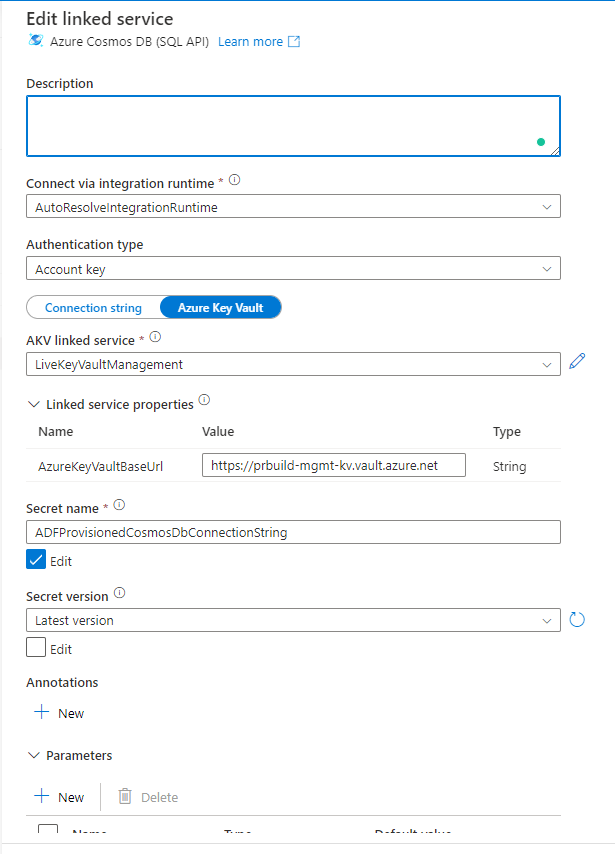
With Azure Data Factory UI experience, one can create a linked service to Cosmos DB (SQL API) with a linked service to Azure Key Vault using the Account Key type authentication. In this particular scenario, we have added secrets to the Azure Key Vault for the Cosmos DB connection string but we do not want the connection string to include "Database=xxx" as we would like to parameterize that so that we do not have to add connection strings for each Cosmos DB databases to the key vault. Unfortunately, the UI does not offer any option for us to specify "Database=xxx" to the Cosmos DB-linked service using Azure Key Vault. You can switch to use Connection String mode, but then one would have to pass in Cosmos DB Uri and then use the access key from Azure Key Valut secret. Do we have any option here using a linked service to Azure Key Vault to construct a linked service to Cosmos DB with a parameter for the Database name?

An Azure service for ingesting, preparing, and transforming data at scale.
' cx='32' cy='32' r='32' /%3E%3Ctext x='50%25' y='55%25' dominant-baseline='middle' text-anchor='middle' fill='%23FFF' %3EKM%3C/text%3E%3C/svg%3E)
Hello @XiangChenxchen1-7804,
Thanks for the question and using MS Q&A platform.
If you use Azure Key vault mode after the Account Selection method settings, then you won't be able to parameterize your database name as you will have to provide the complete connection string in the AKV. You cannot pass the parameters values to AKV to validate the connection string.
Hence you will have to take second approach to go with Connection String mode after Account selection method settings. Then you will be able to save your Account key in Key vault and also you can parameterize the accountEndpoint in the URI section as well as you can parameterize the database name and pass them at runtime using pipeline parameters as needed.
Please see below for more info:
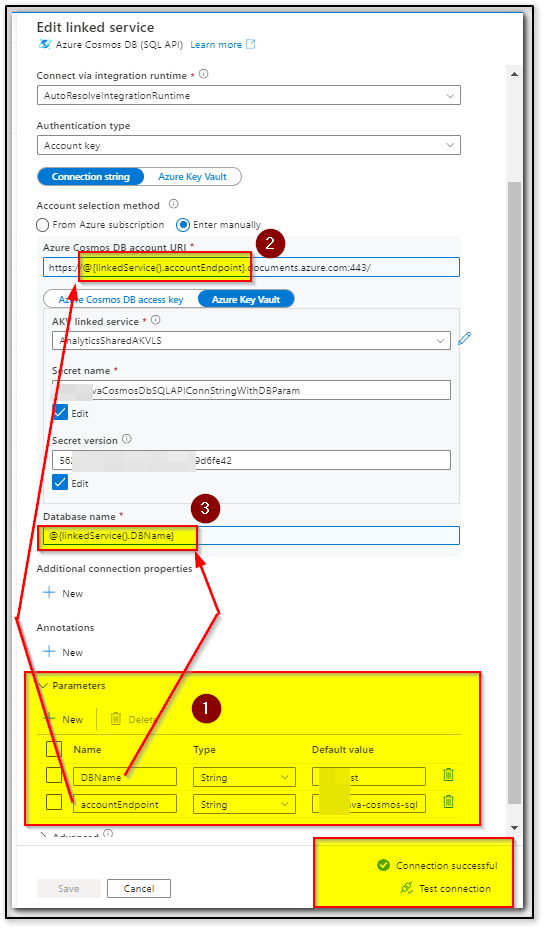
Here is a sample JSON payload of my test DBName parameterized linked service:
{
	"name": "CosmosDb1SQLApiParameterizedDB",
	"properties": {
		"parameters": {
			"DBName": {
				"type": "string",
				"defaultValue": "DefaultDBName"
			},
			"accountEndpoint": {
				"type": "string",
				"defaultValue": "DefaultEnpointName"
			}
		},
		"annotations": [],
		"type": "CosmosDb",
		"typeProperties": {
			"connectionString": "AccountEndpoint=https://@{linkedService().accountEndpoint}.documents.azure.com:443/;Database=@{linkedService().DBName}",
			"accountKey": {
				"type": "AzureKeyVaultSecret",
				"store": {
					"referenceName": "xxxxxxxSharedAKVLS",
					"type": "LinkedServiceReference"
				},
				"secretName": "xxxxxxxCosmosDbSQLAPIConnStringWithDBParam",
				"secretVersion": "56xxxxxxxxxxxxxxxxxxxxxxxxx6fe42"
			}
		}
	},
	"type": "Microsoft.DataFactory/factories/linkedservices"
}
Hope this will help. Please let us know if any further queries.
------------------------------
 or upvote
 button whenever the information provided helps you. Original posters help the community find answers faster by identifying the correct answer. Here is how
Thanks for the info provided. We will take the connection string approach knowing the limit from the key vault secret. It does seem that Microsoft could enhance it to allow the same flexibility as the Key Vault settings to have an optional Database property so that we do not have to create multiple key vault secrets for every database with the same endpoint and account key.
Hello @XiangChenxchen1-7804,
Thanks for your response and feedback. It would be really helpful if you could log your feedback in IDEAS forum here: https://feedback.azure.com/d365community/forum/1219ec2d-6c26-ec11-b6e6-000d3a4f032c All the feedback shared in this forum are actively monitored and reviewed by respective product owners.
Also please do share the feedback URL once it is logged so that I can pass to respective product owners for further review. It also helps other readers to up-vote and comment on your suggestion to help increase the priority of the request.
Hope this info helps.
Thank you