Note
Access to this page requires authorization. You can try signing in or changing directories.
Access to this page requires authorization. You can try changing directories.
[This article is prerelease documentation and is subject to change.]
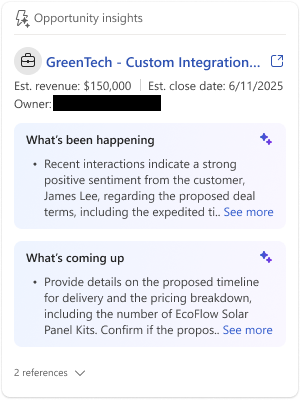
The Opportunity insights card provides a consolidated view of opportunity-related emails and meetings. It highlights risks and upcoming actions to help you stay updated without leaving Outlook. The card offers a detailed perspective on the opportunity by analyzing all related emails and meetings. It helps you understand potential risks and progress. For an opportunity, the Sales agent provides AI-generated insights to indicate how the opportunity is evolving.
Important
- This is a preview feature.
- Preview features aren’t meant for production use and might have restricted functionality. These features are subject to supplemental terms of use, and are available before an official release so that customers can get early access and provide feedback.
When you work on opportunities, you often juggle multiple activities, making it challenging to keep track of key insights from each interaction. The Opportunity insights card brings together all these events and surfaces opportunity-level insights directly within Outlook. If you have access to an opportunity in CRM, you can see insights from all relevant emails and meetings, even those you didn't attend. This feature helps you stay updated and informed without leaving your workflow.
Where to see the Opportunity insights card
You can see the Opportunity insights card in the Sales pane in Outlook when you open an email or a meeting.
Note
- When you view an email, the Opportunity insights card appears only when the email is connected to an opportunity. Once the opportunity is connected, the card displays insights from all relevant emails and meetings.
- When you're viewing a meeting in Outlook calendar, the Opportunity insights card is displayed only when the meeting is connected to an opportunity.
- Email insights are available for up to 90 days and appear only when the email meets the following criteria:
- The email has at least one external contact that is a CRM contact.
- Server-to-server (S2S) connection is turned on.
- Email insights are turned on.
- The email's sensitivity label matches the labels configured by your administrator.
Prerequisites
- Meeting insights must be turned on in Access settings.
- Email insights must be turned on in Access settings.
- Email insights sharing must be turned on.
Access the Opportunity insights card
In Outlook, open an email or a meeting.
Go to the Opportunity insights card.
Select See all risks and insights for this opportunity to view detailed information.